 OfferBull
SOC Analyst Interview Questions and Answers (Tier 1–2) | OfferBull

SOC Analyst Interview Questions and Answers (Tier 1–2)
The interviewer drops this on you cold: privilege escalation alert on a domain controller, SIEM marked it high, clock starts now. What do you do in the first five minutes?
You’ve closed tickets like that before. Saying the order out loud is the part that trips people. Jump to “wipe the box” and you sound reckless. Freeze and you sound green.
SOC analyst interview questions, especially Tier 1 and Tier 2, are less about rattling off every MITRE ID and more about calm triage. Can you say what you’d look at next? Do you know when to escalate instead of poking around alone?
I’m going to walk the questions that show up a lot, with sample answers you can steal the shape from (not the words). The numbers and ticket details are made up. If you want the wider security loop beyond SOC, start with how to prepare for security engineering interviews and come back here for the alert queue.
What Tier 1–2 interviews actually feel like
You’ll get concept checks, a messy alert, some networking and log reading, a short incident walkthrough, and one behavioral story. Tier 1 is triage, escalation criteria, and whether you’ve touched a SIEM. Tier 2 pushes on correlation, how you’d talk about containment at a high level, and whether your write-up would help the next person.
They almost never ask you to run an attack. If a question slides that way, stay on the defender side: what you’d observe, who you’d call, what goes in the ticket. This post is interview prep. Not a guide for breaking into anything.
SIEM, alert triage and false positives
1. Walk me through how you’d triage a high-severity SIEM alert.
I’d open with the alert row itself. Rule name, severity, host, user, time window, and whether this rule has been noisy lately. Then context: right asset group? User on PTO? Change ticket sitting in the queue? After that I pull related events in the same window instead of staring at one row. If it still looks real, I follow the playbook for that alert type and escalate with a short note of what I already checked. If it looks like noise, I close it as a false positive with evidence, not vibes.
2. How do you decide something is a false positive?
The alert fired on activity that doesn’t match the risk the rule was written for. Benign stuff that fits: scheduled scan, known admin tool, asset tagged wrong. I compare to baselines and older tickets. “We’ve seen this before” is not enough by itself. And if the same rule keeps crying wolf on good activity, I file a tuning note with sample events so detection can fix the logic.
3. True positive, false positive, true negative, false negative?
True positive: bad or policy-breaking activity, alert correct. False positive: alert fired, activity was fine. True negative: quiet night, nothing bad. False negative: something bad happened and nothing fired. That last one is why coverage matters as much as cutting noise.
4. Impossible travel on a user account. What do you check?
Login events: source IPs, geo, device, MFA, and whether the sessions overlap in a way travel or VPN can’t explain. Lost device ticket? Travel request? Other accounts from that IP looking weird? Second login from a high-risk region, no MFA, brand-new device: treat it as suspicious and escalate on the identity playbook. Corporate VPN exit they always use: document it and close with that evidence.
 Triage rewards a boring order: context, related events, playbook, then escalate or close with proof.
Incident response, NIST-style (conceptual)
A lot of interviewers want a framework. NIST’s high-level stages are a safe spine: preparation, detection and analysis, containment, eradication and recovery, post-incident activity. Keep it conceptual. You’re showing you know what belongs in each stage, not handing out an attack cookbook.
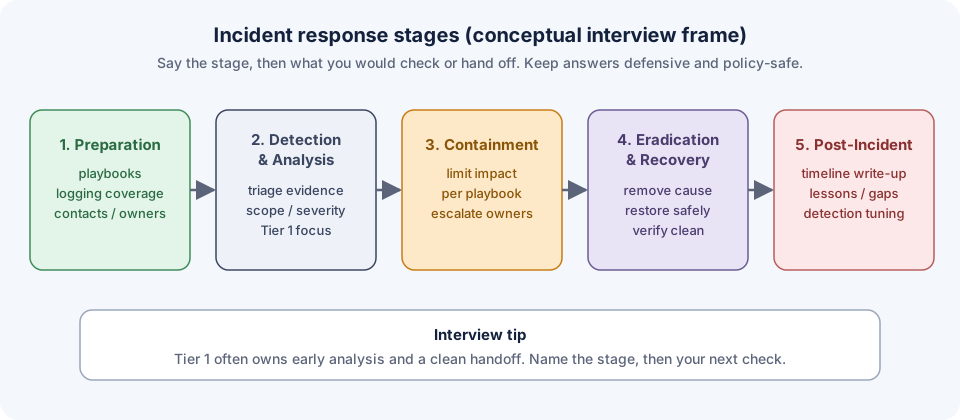 Name the stage, then your next check. That’s usually enough for the first answer.
5. Walk an incident with those stages.
Preparation is the boring work before anything breaks: playbooks, logging coverage, who owns what. Detection and analysis is most of Tier 1 life. Alert in, gather evidence, decide if it’s real, rough out the blast radius. Containment is limiting damage once the right owners agree on the approach for that case. Eradication and recovery: remove the cause, bring systems back carefully. Post-incident: write-up, lessons, detection gaps. I’d stress that Tier 1 often owns early analysis and a clean handoff, not every containment call solo.
6. Escalate or keep the ticket?
Escalate when impact is ugly (domain controller, payments, confirmed credential theft), when you’re past the playbook and still unsure, when containment needs a change you don’t own, or when a severity SLA is about to blow. Keep working when the playbook is clear, evidence matches a known FP pattern, or you can finish scoping and leave a clean note. A short summary of what you already checked beats “this looks bad.”
7. What goes in the ticket write-up?
Timeline of what you saw and when. Hosts and users. Log sources checked. Current hypothesis. Actions taken. What you still don’t know. Write it so the next analyst doesn’t redo your work.
Networking, ports and logs
8. Host talking to an external IP on a high port.
If endpoint telemetry exists, grab process and user. Check DNS and proxy for the destination. See whether that IP or domain shows up in threat intel your team already trusts. Compare volume and timing to that host’s baseline. Is the destination on an allow list for a known updater? Ask “is this expected business traffic?” before you jump to C2.
9. TCP vs UDP, and why an interviewer cares.
TCP does a handshake. UDP doesn’t. Unexpected outbound TCP to a rare destination means a session got established. UDP shows up in DNS, some VPN cases, streaming, and a pile of noisy reflection junk. The protocol tells you what evidence to reach for next.
10. Firewall, DNS and auth logs together.
Firewall: who talked to whom, allow or deny. DNS: which names got resolved first. Auth: who signed in, from where. Put together: which identity, which name, which destination, was the path allowed. That correlation is the job a lot of nights.
11. Ports you’d expect, and why an odd one isn’t automatic doom.
I’d mention 443, 53, SSH where admins use it, directory ports on DCs in a Windows shop. A weird high port alone proves nothing. Process, user, rare destination, change ticket. Say that out loud so you don’t sound like you’re alerting on port numbers.
Scenario answers
12. Failed logins, then success, then a new mailbox rule.
Possible account takeover pattern. Pull the auth timeline, source IPs, MFA. Look at the mailbox rule and whether mail is forwarding off-domain. Other risky actions in the same window? Follow the identity playbook. Containment steps like reset and session revoke usually belong to the team that owns identity. Notify the user on a trusted channel. Escalate if mail or other accounts look touched. Document the timeline before you change things you don’t own.
13. AV quarantine on one laptop, same hash on a file share.
Confirm hash and path on the laptop. Who wrote the file to the share, and when? Search endpoint and share logs for that hash elsewhere. Did anyone else execute it? Escalate with scope: one laptop vs many, how widely readable the share is. Don’t start deleting share content if that’s outside the playbook.
Behavioral follow-up, fictional STAR (shape only):
I was Tier 1 overnight. A new “rare PowerShell” detection kept firing on a build server. Queue was filling. I pulled command lines for the top hosts, matched them to a CI job that had rolled that morning, and checked the change ticket. Same parent process, same signed script path. Closed the night’s tickets as FP with that evidence and opened a tuning request with samples. Day shift confirmed. Rule got a filter for the build account. Habit I kept: FP needs evidence plus a tuning note, not “known noise.”
More on shaping stories: STAR method guide.
 One clean timeline beats three vague “I escalated stuff” answers.
Mistakes that sink the interview
Wiping machines in your answer before you’ve scoped anything. Sounding eager to demo attack tools. Dumping MITRE IDs without saying which log you’d open. Closing FPs with no evidence. Freezing on “what else would you check?” Keep two or three next places ready: endpoint, identity, network, email.
“I’d open Splunk” is not an answer. Say what shape of query you’d run and what would make you escalate.
Practicing with OfferBull
Reading playbooks helps. Saying the first five minutes out loud, with someone cutting in, helps more.
OfferBull is an AI mock interview app for iOS and Android. An interviewer voice asks questions out loud and you answer by speaking. Paste a SOC or security job description, or upload your resume, and the questions follow that role. It asks follow-ups based on what you said and what’s on your resume. During practice it can show answer suggestions and STAR structures when a story starts wandering. English and Chinese.
Prep tool. Not something you use in the real interview.
FAQ
Do I need a security degree for Tier 1? Often no. Clear triage thinking, basic networking, and proof you can learn their stack go further. Certs help screening. They rarely replace a clean scenario answer.
How much harder is Tier 2? Deeper correlation, better write-ups, more comfort talking containment at a high level. Triage basics still matter.
Will they ask me to exploit something? Decent interviewers stay on defense, detection and analysis. Keep answers conceptual and policy-safe.
How long should a scenario answer run? About 90 seconds to two minutes for the first pass. Offer what you’d check next, then stop.
Practice This Out Loud
Tonight, take the domain-controller privilege-escalation opener and answer it in under two minutes: first checks, escalate triggers, ticket notes. Then run impossible travel once. If both come out in a steady order, try a voice mock that asks follow-ups. → Practice Now