 OfferBull
Salesforce Developer Interview Questions (Apex, LWC, Governor Limits) | OfferBull

Salesforce Developer Interview Questions (Apex, LWC, Governor Limits)
Sticky note on the table: keep Account and Contact phone numbers in sync. Stay under governor limits. Go.
You’ve shipped that. Saying it out loud with bulkification and a failure path is the hard part. Resume says Apex. They want to know if they’d trust you near a production org.
Most Salesforce developer interview questions bounce between Apex, Lightning Web Components, platform limits, a short security or integration check, and one story. I’m walking the ones that show up a lot. Sample answers below are illustrative. Names, org sizes, ticket numbers: made up. Steal the shape. Not the words.
Wider backend loop? How to prepare for backend engineering interviews. Story shape: STAR method guide.
What the round usually feels like
Concept checks. A tiny Apex or LWC design. Limit traps. Sharing and CRUD/FLS. A business ask that fights the platform. Mid-level and senior push on bulkification, async (Queueable vs Batch vs Platform Events), and how you’d catch a bad deploy before users do.
Nobody needs you to recite every limit number. They need a design that doesn’t hit the wall on go-live day.
Apex, triggers and governor limits
1. Bulk-safe trigger. How do you talk it?
Trigger stays thin. One per object if you can. Handlers in a class. No SOQL or DML in loops. Collect Ids, query once, maps, one update. Recursion guard if two paths can re-enter. Tests insert 200 rows. One record tests prove almost nothing here.
2. Governor limits in plain English.
Caps on CPU, SOQL, DML, heap, callouts in a transaction so one messy script doesn’t starve everyone. Your job is designing around them: bulk patterns, selective queries, async when the sync path is fat.
3. SOQL in a loop. Fix?
Burns a query per pass. Two hundred records and you’re done. Gather Ids, one IN :ids query, map, loop in memory. Same for DML: one list update.
4. Queueable, Batch, or future?
Future for simple callouts out of trigger context when you don’t need chaining. Queueable when you want chaining or cleaner arguments. Batch when you’re chewing large volumes in chunks. Say which fits the volume and whether a human is waiting on the screen.
5. Testing callouts.
HttpCalloutMock. Never hit a live endpoint from a test. Assert the request shape. Cover 200 and the ugly path you’d log or show.
 Bulk first. Then name the limit you’re protecting.
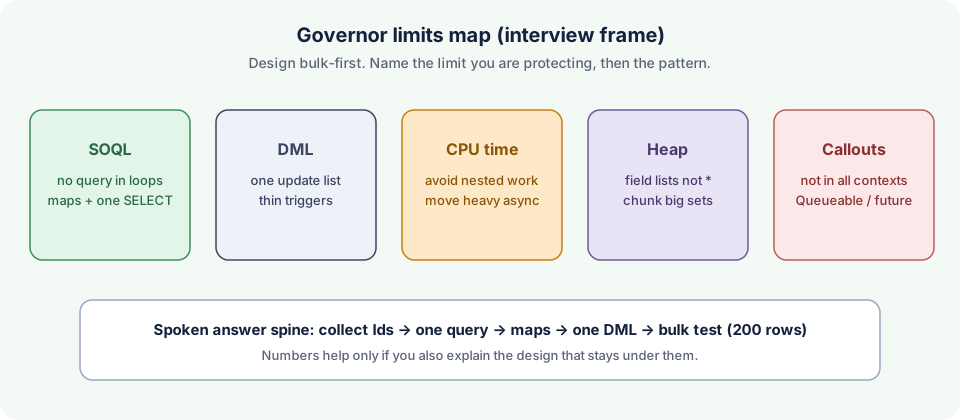 Habit beats memorized numbers.
Lightning Web Components
6. LWC vs Aura, short version.
LWC is the modern path. Smaller. Closer to the web platform. Aura hangs around in older orgs. New work: LWC unless something hard blocks you. Coexistence without a rewrite day-one is a good story.
7. Data into an LWC.
@api parent to child. Wire or imperative Apex for server data. Events (sometimes LMS) the other way. Sketch a parent form, child display, one Apex wire. That’s usually enough.
8. Wire or imperative?
Wire for reactive reads. Imperative for button clicks, chaining, custom error flow. Don’t wire a write.
9. Lightning Data Service.
Fine when standard create/edit/view fits and you want FLS and sharing for free. Custom Apex when the query or write is weird, spans objects awkwardly, or needs server rules the UI API won’t give you.
Integration and security
10. Connected app + OAuth. What do you watch?
Scopes. IP rules. Cert vs secret. Named credentials for callouts. Least privilege on the integration user. Rotate secrets. Log enough to debug without dumping PII into debug logs.
11. with sharing vs without sharing.
with sharing follows the running user’s record sharing. without sharing is system-mode for records (FLS is a separate fight). Default with sharing. Document the exception. Test CRUD/FLS on purpose when you skip the easy path.
12. CRUD and FLS in Apex.
isAccessible / stripInaccessible style checks before query and DML. Permission sets don’t save you if Apex ignores them. Say that. People fail this one quietly.
13. Platform Event, CDC, outbound message.
Platform Events for custom pub/sub. CDC for near-real-time record change sync. Outbound messages are the older SOAP push. Pick based on the consumer and whether you need replay.
Scenarios (this is where they lean in)
14. Product wants a screen flow that flips a flag on 5,000 Opportunities.
Sync DML on thousands is a limit and locking trap. Batch or Queueable. Ask what “done” looks like for the user. Overnight chunks plus an email beats a frozen browser. Polite no with a plan beats a smile and a production incident.
15. Trigger only fails in prod on 200-row Data Loader jobs.
Reproduce at 200 in a test. Look for SOQL-per-row, locks, recursion, package noise. Fix with maps and one DML. Leave a bulk regression test so it can’t sneak back.
Here’s a fictional STAR for the behavioral follow-up. Shape only.
I owned a before-update Opportunity trigger that looked fine with ten sandbox rows. Prod Data Loader jobs of a few hundred started timing out. Logs showed a helper querying per row. I rewrote it to one query plus a map, added a 200-row test, and the next night’s jobs cleared under the CPU cap. Habit that stuck: every trigger test includes a bulk case.
More on shaping stories: STAR method interview questions and examples.
 One bulk horror story beats three vague “I wrote triggers” lines.
How I’d prep the week before
Pick two triggers you’ve written and retell them at bulk size. One LWC with parent-child data and an Apex error path. One sharing/FLS answer. One story about a limit you hit (or almost hit) and what you changed. Practice interrupting yourself: “what about 200 records?” halfway through. If the answer collapses, the design wasn’t clear yet.
If your loop also has automation testing overlap, the SDET interview questions post is adjacent, not a substitute. Salesforce still wants platform-native answers.
Mistakes that sink the round
SOQL or DML in loops with no bulk story. Limit trivia with no design. “Just turn off sharing” with no reason. LWC answers that never mention events or Apex errors. Blaming “Salesforce limits” instead of redesigning.
Whiteboard time? Draw trigger, handler, one map, one DML. Ugly boxes are fine. Order matters.
Practicing with OfferBull
Trailhead helps. Saying a bulkification answer while someone cuts in with “what about 200 records?” helps more.
OfferBull is an AI mock interview app for iOS and Android. An interviewer voice asks questions out loud and you answer by speaking. Paste a Salesforce developer job description, or upload your resume, and the questions follow that role. It asks follow-ups based on what you said and what’s on your resume. During practice it can show answer suggestions and STAR structures when a story starts wandering. English and Chinese.
Prep tool. Not something you use in the real interview.
FAQ
Do I need every Salesforce cert? Helps screening. Clear Apex + LWC + limits usually matter more in the technical round.
How deep on LWC? Parent-child data, wire vs imperative, one component you’ve actually shipped. Trivia without a design story wears thin.
Live coding? Sometimes a shared editor or paper trigger. Talk bulk and tests even if the syntax is rough.
How long for a scenario? Ninety seconds to two minutes first pass. Name the limit risk, then the redesign. Stop.
Practice This Out Loud
Tonight: Account-Contact phone sync in under two minutes. Handler shape, bulk maps, one DML, how you’d test 200 rows. Then the 5,000-Opportunity flow pushback once. Steady? Try a voice mock that asks follow-ups. → Practice Now