 OfferBull
Video Interview Tips: Setup, Body Language and Common Questions | OfferBull
Video Interview Tips: Setup, Body Language and Common Questions
I balanced my laptop on a cutting board last time I practiced, because the actual desk had vanished under unopened mail. The little self-view in the corner made my forehead look damp. The other person was still on mute. Then the red icon vanished and they said, “Can you hear me? Sorry, one second.” I nodded. They waited. Nodding doesn’t travel through a speaker.
Most video interviews feel like that, not like the glossy checklists. Maybe it’s Zoom. Maybe Meet, Teams, Webex. The invite picks the tool. Sometimes nobody’s even there, just a recording page that stares at you. Either way they have a small camera, a delay, and whatever story you can get out of your mouth before the connection hiccups.
The video interview tips worth your time are pretty unglamorous. Where the lamp sits. Where your eyes go. What your hands do when you forget you have hands. And the questions that keep showing up, written the way you’d actually say them. I’ll use made-up names and numbers in the samples. Please invent none of that on the day. Use your own week.
One-way timed recordings have their own quirks, so after you sort the room, read HireVue and one-way video interview questions. Shared editor plus a coding prompt? That’s closer to remote technical interviews. Everyone else can stay here. Store leads, marketers, support folks, people in finance, coordinators. Engineers too, when the round is still just a conversation.
I should mention the AI rule before anyone skims past it. Plenty of employers now forbid help during a live call or a recorded one. Sometimes it’s in the invite. Sometimes they say it after hello. OfferBull is the rehearsal you do on Tuesday night in the kitchen. Leave it closed when their link opens. No second screen. Nothing in your ear. If the email is vague, ask the recruiter. I treat anything unclear as closed-book.
Get the room boring
I would rather you spend twenty minutes on the room than two hours rewriting “tell me about yourself” in a doc you’ll never say out loud.
Camera at eye level. Stack of books under the laptop if that’s what you’ve got. Looking down at a keyboard makes you look tired even when you’re not. Looking up at a monitor on a dresser makes you look twelve.
Light in front of you. A window works. A lamp works. Overhead kitchen lights alone carve shadows under your eyes that no amount of smiling fixes. If it’s night, turn the lamp on and close the blinds so the window doesn’t become a black mirror.
Sit far enough back that they can see your shoulders. Not so far that you’re a talking postage stamp. Test this by joining a dummy Meet with yourself.
Audio first, video second. I mean that. A muddy voice with a perfect background loses to a clear voice in front of a plain wall. Wired earbuds beat laptop mics if the room echoes. If the earbuds make you look like a call-center agent and the room is quiet, the laptop mic is fine. What I would not do: Bluetooth that cuts when you turn your head.
Background: blank wall, bookshelf with the spines not readable from camera distance, or a tidy corner. No laundry pile. No partner walking through in a towel. Put a note on the door.
Internet: plug in if you can. Close the backup of photos that’s been running since Tuesday. Have your phone hotspot ready and actually tested once, not theoretically ready.
Dress from the waist up like the first in-person round. They will see fabric. They will also see if you keep glancing at a second monitor, so close Slack and kill the calendar pop-ups. A few notes on paper, off camera, beat a script on a side screen. Your eyes wander and it reads as reading.
If English isn’t the language you think in, the camera adds extra load. Job interview tips for non-native English speakers covers pace and pauses without asking you to fake an accent.
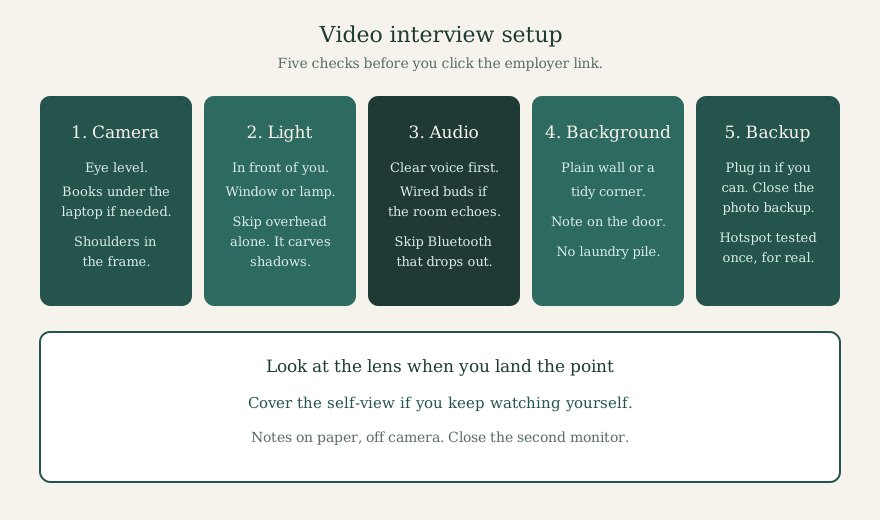 Five checks before you join. None of them need a ring light you bought last night.
Talk to the lens, not to yourself
The weirdest part of a video interview is the little movie of you in the corner. People watch themselves. Then they look thoughtful and slightly sad, because that’s the face you make when you watch yourself talk.
Drag your self-view away, or shrink it, or cover it with a sticky note. Look at the camera bump when you deliver a point. You don’t have to stare at it the whole time. That looks intense in a bad way. Glance at their face when they’re speaking so you can catch a nod or a frown. Come back to the lens when you land a result.
Sit on your sit bones, not slouched into the chair. Lean in a little when they ask something you care about. Lean back when you’re listening. Tiny moves. Big ones knock the laptop or send you out of frame.
Hands: keep them visible if you gesture. Hidden hands make people look stiff. Flailing hands look like you’re conducting. Elbows on the desk, palms in the lower third of the frame, is plenty.
Nod once when they finish a question so they know the delay isn’t a freeze. Then take a breath. Video lag makes people step on each other. “Sorry, go ahead” is a normal sentence on these calls. Use it.
Don’t perform energy you don’t have. A lot of advice says “be 20% bigger on camera.” That turns into a fake laugh that dies in the speakers. Clear and a bit slower than you’d talk at a coffee shop is enough. If you speed up when you’re nervous, plant both feet and finish the sentence you’re in before you start the next one.
Silence after you finish is fine. They’re writing. Filling it with “does that make sense?” three times makes you sound unsure about a story that was fine.
Questions you’ll hear on almost every video call
The format changes. The questions don’t, much. A phone screen asked over video is still a screen. A hiring-manager chat on Zoom is still a hiring-manager chat. Prepare the stories, then practice saying them to a camera so the first time you hear your own voice isn’t during the real one.
Sample answers below are illustrative. Swap in your own work.
“Tell me about yourself.”
They want a short arc, not your life. Present role, a couple of relevant wins, why you’re talking to them. Two minutes max. Longer treatment: how to answer “Tell me about yourself”.
How it might sound:
“I’m an operations coordinator at a regional grocery chain. For the last year I’ve owned the weekly delivery exceptions report, the one that used to land in four inboxes and nobody trusted. I rebuilt the sheet so store managers only see their own misses, and the duplicate tickets dropped enough that our lead stopped doing a Sunday sweep. Before that I was on the service desk, which is where I learned I like messy process more than I like a quiet inbox. Your posting is honest about the exception volume, and that’s the work I already do. That’s why I applied.”
Notice there’s a result in there. “I work hard and I’m a team player” does not have one.
“Walk me through a recent project.”
Pick one. Not three. Situation in two sentences. What you owned. Two or three things you actually did. What changed.
“Last spring our returns form was sending everything to one shared mailbox. I was the person who sorted it at 7am. I mapped the five most common reasons, asked IT for a dropdown that routed by type, and sat with two store leads for a week while they tested it. Wrong-box tickets fell, I want to say by about a third over six weeks, based on the tag we added. I’d still change the ‘other’ option. People hide everything in ‘other.’”
That’s spoken. It’s not a slide deck.
“Tell me about a time you disagreed with someone.”
They want conflict that was real, not a story where everyone hugged at the end for no reason. Use the STAR method if it helps you not ramble. More of these live in behavioral interview questions and answers.
Situation: I was scheduling weekend coverage for a chat team, and a senior agent wanted to keep the old “whoever grabs it” system. Task: I needed a rotation that didn’t burn out the same two people. Action: I pulled four weekends of missed chats, showed him the same two names on every Saturday, and asked him to pilot a written rotation for three weekends instead of arguing the principle. Result: Missed chats dropped that month. He kept the sheet. I was not his manager. The sheet was the win, not a speech.
Out loud I’d shorten that:
“Weekend coverage kept slipping and it was always the same two people. I wasn’t the manager. I pulled four Saturdays of missed chats, put the names next to the gaps, and asked the senior agent to try a written rotation for three weekends instead of debating it in Slack. He agreed to a pilot. Missed chats dropped. The sheet stayed. That was the point.”
“Why this role? Why this company?”
One company-specific detail. One skill match. No flattery paragraph about their mission statement.
“You mentioned on the screen that this team still closes the month in a shared spreadsheet. I’ve been the person who inherits that spreadsheet. I want to clean it up, not admire it from a new title. And the job post is clear that vendors will call at 4:55. I’d rather know that now.”
“What’s a weakness?”
Pick a real one you’re already working on. Not “I care too much.” Longer bank: what is your greatest weakness.
“I used to send status updates that were novels. My last manager asked me to stop burying the ask in paragraph four. I switched to three bullets and a deadline at the top. She still forwards those. I still have to delete the extra sentences before I hit send.”
“Do you have any questions for me?”
Yes. Two that you couldn’t have copied from a list without listening. The longer menu is in questions to ask at the end of an interview. On video, write them on paper so you’re not alt-tabbing.
A few more that show up constantly:
- How do you prioritize when everything is urgent?
- Tell me about a time you received tough feedback.
- Describe a time you improved a process.
- Where do you see yourself in a few years? Stay concrete; we wrote a longer piece on where do you see yourself in 5 years.
- What would your last manager say you still need to get better at?
If a prompt is hypothetical, lead with your approach, then add one real example if you have it. “I would…” forever sounds thin on a recording.
The AI note people keep blurring
I’ll say this plainly, because the line gets sold in both directions.
Many employers ban AI assistance during a live or recorded interview. That includes chat windows, suggested answers while you’re speaking, someone feeding you lines, and anything in an earpiece. Some companies will disqualify you if they catch it. Some put the rule in the confirmation email. Policy varies, and I can’t list every employer’s wording here.
What does not vary: if you wouldn’t look at a friend’s texts during an in-person interview, don’t do the digital version on Zoom.
OfferBull is an interview practice app. You use it before the call, the same way you’d use a friend in the kitchen asking you questions. Not during the call.
If a one-way tool’s instructions mention locked browsers, disabled copy-paste, or a warning about outside assistance, read that screen. Retake rules and timers also vary by employer. Don’t trust a forum post from 2023 about how many takes you get.
Practice the way the interview actually feels
Reading answers in a Google Doc trains reading. Video interviews grade talking at a lens while a small delay makes you unsure whether they heard you.
Tonight, if you have forty minutes:
- Set the laptop up the way you will on the day. Same chair. Same light.
- Pick five prompts from the list above.
- Phone timer: twenty seconds to think, ninety seconds to talk.
- Front camera. Record.
- When the timer ends, stop. Even mid-sentence, once, so you feel the cut.
- Replay each take once. Three scores only: Did you answer the question they asked? Was there a result? Were your eyes mostly on the lens, not on yourself?
Change one thing per take. Shorter setup. Louder ending. Fewer “um.” Then switch prompts. Rewriting the whole story between takes is how people burn an evening and still freeze on Thursday.
A fuller at-home plan is in how to practice for an interview. Extra prompts: mock interview questions. The week-before logistics sit in how to prepare for a job interview.
OfferBull is an AI mock interview app for iOS and Android. A voice interviewer asks questions aloud. You answer by speaking. Paste the job description or upload a resume so the prompts match the seat. Follow-ups track your answers and your resume. While you practice, you get answer suggestions and STAR structures. English and Chinese both work. Use it in the days before the call. Close it before you click the employer link.
Mistakes I keep seeing on recordings
The tour of the apartment. They don’t need your cat or the construction outside unless something actually interrupts. If it does, say so, mute, fix it, come back.
Reading. Even good writing sounds like reading on camera. Three bullets on paper. Then talk.
Apologizing for the internet the whole time. One “sorry, I think I froze” is enough.
A virtual background that shimmers around your hair. A real plain wall is calmer.
Forgetting you’re still on after “any questions?” Stay in the chair until they hang up. Then slump.
Answering into the self-view. I’ll say it again because it’s the first thing I notice on practice tapes.
FAQ
Should I stand or sit? Sit, unless you already present standing and your camera is set for it. Standing with a laptop pointing up your nose helps nobody.
Is it okay to use notes? Short notes, off camera. If your eyes keep sliding left, they can tell. Rehearse enough that the notes are a safety net, not a script.
What if my connection drops? Call back on the same link. If that fails, the phone number in the invite, then the recruiter. Have those two things written down before you join.
Do I look at the camera the entire time? No. That feels stiff in a bad way. Look at them while they talk. Look at the lens when you deliver the point you want them to remember.
Are one-way interviews scored by software? Some vendors advertise automated review. Some are reviewed by humans. You usually can’t know, and guessing doesn’t change the work: answer the question, include a result, look at the lens. Timed-recording specifics: HireVue guide.
Can I use OfferBull during the interview if I get stuck? No. Practice before. Many employers ban assistance during the live or recorded session.
Practice This Out Loud
Tonight: five common video prompts. Same chair and light you’ll use on the day. Twenty seconds to think. Ninety seconds to talk at the camera. Replay each once and fix one lever. Then a short voice mock with follow-ups. → Practice Now
Take Control of Your Career Path:
- Official Site: www.offerbull.net/mock-interview
- iOS App: Download for iPhone/iPad
- Android App: Download for Android