 OfferBull
Terraform Interview Questions (State, Modules, Workflows) | OfferBull

They don’t ask you to define infrastructure as code. They ask: “You and a teammate both ran apply from your laptops this morning. One apply failed halfway. Where is the state, and who was allowed to write it?”
If you say “it’s in a file” and stop, you have not answered. They want to know whether that file is shared, whether two applies can collide, and whether a secret just landed in a JSON blob someone committed by habit.
That is what terraform interview questions feel like on a DevOps or platform loop. State first, then modules and workspaces, then how plan and apply actually run in CI, then the messy follow-ups: drift, secrets, a replace you didn’t mean to do. This is a spoken question bank, not a week-by-week DevOps study plan. For the broader prep loop, use how to prepare for DevOps and SRE interviews. If the round leans into cloud architecture, how to prepare for cloud and platform engineering interviews covers the process. If they ask how you’d store state on AWS or Azure, use AWS interview questions and Azure interview questions as complements. Don’t answer a Terraform question by swapping cloud product names.
The sample answers are illustrative, not a script from a real loop. Say them out loud anyway. The weak lines only show up when you have to finish the sentence.
State, backends, and locking
State is how Terraform maps each resource in your configuration to a real object in the cloud. Without it, Terraform cannot tell a bucket it already created from a bucket it should create again. The default is a local file, terraform.tfstate, in the working directory. That is fine for a throwaway experiment on your machine. It is not a team plan. It lives on one laptop, it is easy to commit by mistake, and two people cannot safely apply at the same time.
For a shared environment I’d use a remote backend. Common ones interviewers name: S3, AzureRM, GCS, or HCP Terraform (you’ll still hear “Terraform Cloud,” the older name). The backend holds the state, and, if it supports locking, it stops a second apply from writing while the first is in flight. Locking is not automatic on every backend, and it is not always on by default. I’d say which backend this team actually uses, and whether locking is enabled, rather than reciting a catalog.
On S3, the current official way to lock is use_lockfile, a lock object next to the state. Interviewers often still say “S3 plus a DynamoDB table.” That pattern existed for a long time, and HashiCorp now marks DynamoDB-based locking as deprecated. I’d enable the native lockfile, and I’d recognize the DynamoDB answer if they still use it. I’d also turn on bucket versioning so a bad write can be recovered. On Azure, the azurerm backend stores state as a blob and uses Blob Storage’s own locking. I would not invent a custom schema for the state file. It is JSON Terraform already owns.
State can contain secrets. Database passwords, private keys, and other attributes providers write back often land there in plaintext unless you have designed them not to. So I would never commit state to git. I’d encrypt it at rest (S3’s encrypt option, or the encryption HCP Terraform applies, or whatever the chosen backend documents), restrict who can read the object, and treat a leaked state file as a credential incident, not a messy checkout.
A spoken version I’d actually use:
“State is the map from our config to real resources. I wouldn’t keep production state in a local terraform.tfstate. I’d put it in a remote backend, S3 or AzureRM or HCP Terraform, with locking on, and I wouldn’t commit that file. If two applies can run at once, or if a secret can sit in a laptop checkout, the backend isn’t doing its job.”
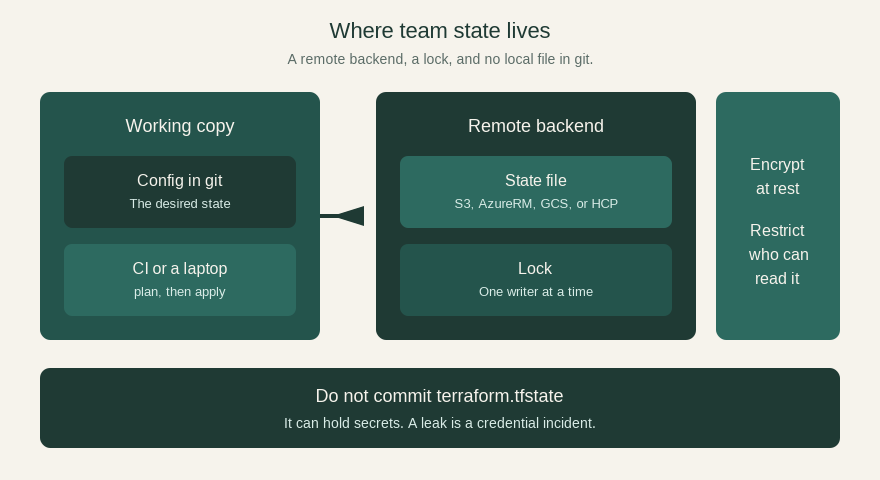
Where I’d put team state: a remote backend, a lock, and no terraform.tfstate in git.
Modules and workspaces
A module is a folder of Terraform configuration you can call from somewhere else. The root module is what you apply. Child modules are the reusable pieces: a network pattern, a queue plus a dead-letter queue, an opinionated app environment. I’d use an internal module when the pattern is ours and we want one place to change it. I’d use a public registry module when the thing is generic and we are willing to pin a version and read what it actually creates. I would not pull an unpinned registry module into production and hope the next tag is boring.
A module should have a clear interface: variables in, outputs out, and a documented set of resources. I’d also say what I would not hide inside one. A module that creates a network, a cluster, a database, and a DNS zone is hard to review and harder to reason about when something breaks. I’d rather compose smaller modules from the root than build a “whole platform” module nobody can change safely.
Workspaces are the other word that needs a careful answer. In the Terraform CLI, a workspace is a separate state associated with the same configuration and the same backend. The default workspace is the one you get if you never created another. Named workspaces are convenient when you want a temporary, parallel copy of the same stack, often tied to a feature branch, and you are fine sharing the same backend and credentials.
They are not a magic isolation layer for production versus development. HashiCorp is explicit about this. CLI workspaces share a backend, so they are a poor fit when those environments need different credentials or access controls. In that case I’d use separate states, often separate directories or separate backends, not terraform workspace select prod. Also, CLI workspaces are not the same thing as workspaces in HCP Terraform, which are a different unit of work with their own configuration. If you mix the two names in the room, you will talk past each other.
A spoken version I’d use:
“Modules are how I reuse a pattern without copying a dozen resource blocks. I’d pin versions, keep the interface small, and I wouldn’t hide an entire platform in one module. CLI workspaces give the same config a different state, which is fine for a short-lived copy. I wouldn’t use them as the only wall between prod and dev if those environments need different credentials. That’s a separate state and a separate backend.”
Plan/apply workflows in CI
terraform plan compares configuration to state and to the real objects it can refresh, then proposes changes. It does not make those changes. terraform apply does. If you run apply with no saved plan, it will plan again, ask you to approve, and then apply. In automation, the useful pattern is: save a plan on the pull request, review that plan, and apply that saved plan after merge, usually behind an approval for production.
I would not make “someone applies from a laptop” the only path to production. Laptops drift, credentials leak, and you cannot tell later which commit was applied. A CI job that runs from the repo, with a restricted identity, a recorded plan, and an approval on production, is the habit I’d defend. Local apply is still fine for a personal sandbox.
If the pipeline also builds a container image, I’d keep the jobs honest about order: build and tag the image first, then let Terraform (or the deploy job) roll the new tag. That is a natural handoff, not two tools competing. Docker interview questions is the runtime side of that conversation.
Two commands interviewers still poke at. terraform apply -replace=... is how I’d force a resource to be destroyed and created again when the object is damaged or you need a clean replacement, even though the config didn’t change. The older command is terraform taint, which is deprecated. I’d mention taint once so I recognize it, then use -replace, because the replacement shows up in the plan before anything changes. -target restricts the plan to specific resources. I’d treat it as a last resort in an incident, then immediately follow with a full plan, because a targeted apply can leave the rest of the config and state out of sync.
A spoken walkthrough I’d rehearse:
“On a pull request, CI runs terraform plan and posts the plan. After merge, we apply a saved plan, with production behind an approval. I wouldn’t apply production only from my laptop. If I have to replace a damaged object, I use apply -replace so I can read the plan first. I don’t taint anymore, and I don’t use -target unless I’m already in a hole and I follow it with a full plan.”

A plan on the pull request, then an apply after merge. Production still needs an approval.
Drift, secrets, and the messy follow-ups
Drift is when the real infrastructure no longer matches what state and configuration say it should be. Someone clicked in a console. A provider default changed. An out-of-band script edited a resource Terraform also manages. I’d detect it by running a plan: if the plan wants to change something nobody changed in git, that’s the start of the conversation, not a silent apply. terraform apply -refresh-only updates state to match real objects without changing those objects. That’s useful when you want state to tell the truth before you decide whether to accept the drift in config or put the resource back.
I would not auto-apply a refresh or a drift plan in production without reading it. A “fix drift” job that destroys a disk because someone resized it by hand is a bad surprise.
Secrets are the other messy topic. sensitive = true on a variable or output redacts the value from ordinary CLI output and from some UI views. It does not keep the value out of state. Anyone who can read the state can read that secret. Newer Terraform versions also have ephemeral values, which can be omitted from state and plan files entirely, and some providers now offer write-only arguments. I’d mention that if the version on the job supports it, and I would not pretend sensitive was ever a vault. The better habit is still: keep secrets in a secret manager, have the app or the provider read them at runtime, and avoid baking long-lived credentials into configuration.
terraform force-unlock comes up when a lock was left behind, often after a CI job was killed. I’d only force-unlock a lock I can prove is stale and mine (or my pipeline’s). Unlocking a live apply is how you corrupt state.
count versus for_each is a smaller question that still trips people. count is fine for a fixed number of nearly identical objects. for_each is the better default when each instance has a name or a key, because removing one item from a list used as count can shift indexes and force replacements you didn’t want.
A spoken version I’d use:
“If a plan shows changes nobody made in git, I treat that as drift. I might refresh state first, then decide whether to accept the change in code or put the resource back. I wouldn’t apply it blind. sensitive equals true hides a value in the terminal, not in state. Secrets belong in a secret manager. And I wouldn’t force-unlock unless I know the lock is leftover.”

Talk through the messy follow-up out loud: what the plan would show, and what you would not apply blind.
Night-before drill
I’d run these out loud, timer on, no notes after the first pass:
- What state is, why a local
terraform.tfstateis not a team plan, and where I’d put it instead - How locking works on the backend I’d actually name, including S3’s lockfile versus the older DynamoDB answer
- Modules versus workspaces, and when I would not use a CLI workspace for prod and dev
- Plan on the pull request, apply a saved plan after merge, with production behind an approval
- Drift, what
sensitivedoes not do,apply -replace, and why-targetis a last resort
If a line sounds like a slogan (“we do GitOps” or “state is the source of truth”), say it again until it names a backend, a lock, or a pipeline stage.
Practicing with OfferBull
A list of subcommands will not tell you whether you paused before committing a state file.
OfferBull is an AI mock interview app, available on iOS and Android. A voice interviewer asks questions aloud. You answer by speaking. Paste a DevOps, platform, or Terraform-heavy job description, or upload a resume, for tailored questions. Follow-ups based on what you said and what’s on the resume. While you practice, you get answer suggestions and STAR structures. English and Chinese. It’s for rehearsal before the interview, not a helper during one.
FAQ
Are Terraform CLI workspaces the same as HCP Terraform workspaces? No. CLI workspaces are separate states for one configuration in one backend. HCP Terraform workspaces are a different unit of work, each with its own configuration. Use the names carefully in the room.
Should I still say S3 plus DynamoDB for locking?
Know it, because many teams still run that setup and many interviewers learned it that way. The current S3 backend locks with use_lockfile. DynamoDB-based locking is deprecated. I’d say what I’d enable today, and I’d recognize the older table if they describe it.
Does sensitive = true keep a secret out of state?
No. It redacts the value from ordinary CLI output. The value can still be stored in state and in plan files. Treat state as sensitive, and prefer a secret manager (and ephemeral or write-only options where the version supports them).
When do you use terraform apply -replace?
When you need to destroy and recreate a specific object even though the configuration didn’t change, and you want that replacement in the plan before anything happens. Prefer it over the deprecated taint command.
Is -target a normal way to ship a change?
No. It’s a last resort, usually during an incident, and I’d follow it with a full plan so the rest of the stack is not left half-applied.
Practice This Out Loud
Tonight, talk through state and locking, modules versus workspaces, and the plan-then-apply CI path, each in under a minute. Then do the drift story and the secrets answer with no docs in front of you: what a plan would show, what sensitive does not do, and when you’d use -replace. Record it and listen for filler, and for answers that stop at a product name. After that, run the same questions in a voice mock that pushes back, and close the app before any real interview. → Practice Now
Take Control of Your Career Path:
- Official Site: www.offerbull.net/mock-interview
- iOS App: Download for iPhone/iPad
- Android App: Download for Android