 OfferBull
Snowflake Interview Questions for Data Engineers and Analysts | OfferBull

Snowflake Interview Questions for Data Engineers and Analysts
They share a query profile. The remote spilling bar is the one you notice first. Then they ask whether you’d just resize the warehouse.
If you say “scale it up” and stop, you have not answered. They want to know whether the query is scanning too many micro-partitions, and whether a rewrite would be cheaper than a bigger warehouse.
That is what Snowflake interview questions feel like. Storage versus compute, Time Travel and cloning, streams and tasks, and a cost conversation that starts with the profile. This is a spoken question bank, not a week-by-week pipeline plan. For the broader prep loop, use how to prepare for data engineering interviews. If the shop still transforms in Spark before the load, see PySpark interview questions. A later reporting round is closer to Power BI interview questions.
The answers below are illustrative. Practice them out loud. You will hear the slogans you lean on only when you have to say them to someone.
Architecture: storage, compute, and warehouses
The question is usually some version of: how does Snowflake separate storage and compute, and why does that matter for this workload?
I’d start with the three layers. Persistent data lives in cloud storage, already in Snowflake’s compressed columnar format, split into micro-partitions. Compute is a virtual warehouse: a cluster you start, resize, auto-suspend, and auto-resume, and it does not share CPU or memory with another warehouse. Cloud services sit above that: login, metadata, access control, and query planning. Two warehouses can read the same tables at once, so a dashboard warehouse does not have to fight an ETL warehouse for a cluster. You pay storage for what you keep, and compute for warehouses that are actually running. I would not invent a dollar figure in the room.
Warehouse follow-ups are specific. Size changes how much compute one query can use. Multi-cluster, when the account has it, is for concurrency, not for one spilling query. I would not resize to 2XL to fix a queue of ten analysts. Auto-suspend defaults to ten minutes idle; auto-resume brings a suspended warehouse back when a query arrives. A warehouse that never suspends burns credits even when nobody is querying.
Then they poke at micro-partitions, because “Snowflake has no indexes” is the slogan people hide behind. Every table is split automatically, and Snowflake keeps metadata such as the value ranges in each column. A selective filter can prune partitions it does not need. Clustering keys exist for a reason. On a very large table, if the data no longer sits in a useful order and pruning is weak, you can define a clustering key so related rows live together. Automatic clustering maintains that, and it costs credits, so I would not cluster a small table, or one that is rewritten constantly, just to sound thorough. I’d look at partitions scanned versus partitions total in the profile first.
A spoken version I’d actually use:
“Storage and compute scale on their own. The table lives in micro-partitions; a warehouse is just the compute I attach, and I can auto-suspend it. Two teams can use different warehouses so they don’t contend. If a query is slow, I look at pruning before I change the size. I only mention a clustering key when the table is large and the scan pattern would actually benefit.”
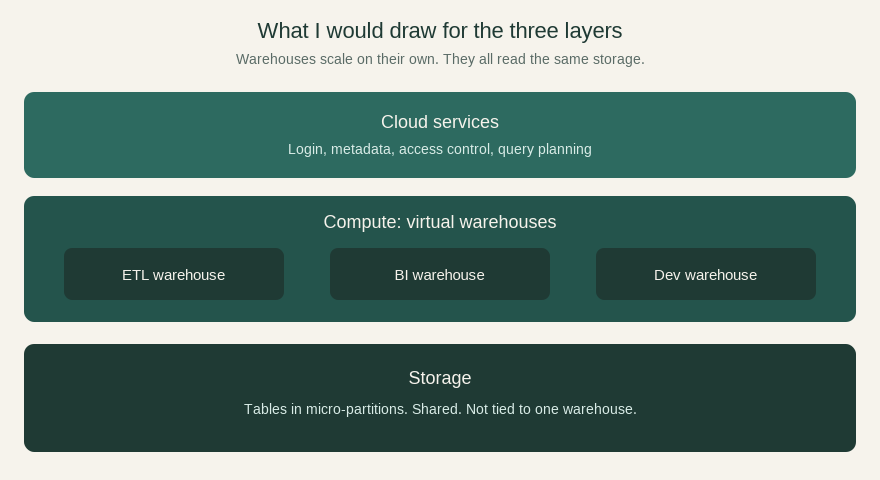
The three layers I’d draw first: cloud services, virtual warehouses, and shared storage.
Time Travel, Fail-safe, and zero-copy cloning
“Can you get yesterday’s table back?” is not a trick question, but a lot of answers mash three different features into one.
Time Travel lets you query, clone, or restore historical versions of tables, schemas, and databases for a retention window. It is on by default. Standard retention is one day, and you can set it to zero to turn it off for an object. On Enterprise edition and higher, permanent objects can go up to 90 days; transient and temporary objects stay at zero or one day. Retention is configurable at the account, database, schema, or table level, so I would not recite “always 90 days.” When the window ends, you cannot query that version yourself.
Fail-safe is the next seven days, and it is not a self-serve “query yesterday” tool. It is a non-configurable, best-effort recovery window that starts when Time Travel ends. Recovery goes through Snowflake Support, can take hours or days, and is meant for extreme loss, not daily undo.
Zero-copy cloning is what I’d use for a dev or test copy. At creation, the clone is metadata: it points at the same storage as the source. You are not paying for a second full physical copy up front. Storage accrues as either side diverges. I clone so someone can break a test copy, or so I can try a backfill, not because “clone” sounds like a backup product.
-- A recent version of the table, within Time Travel retention
SELECT order_id, status, updated_at
FROM analytics.orders
AT (OFFSET => -60 * 60);

-- A disposable copy for a backfill test
CREATE TABLE analytics.orders_dev CLONE analytics.orders;
AT and BEFORE can also take a timestamp or a statement ID. UNDROP is the dropped-object version of the same idea, still inside the retention window.
A spoken answer I’d use:
“If I dropped a table an hour ago, I’d UNDROP it, or query it with Time Travel, if we’re still inside retention. Default is one day; Enterprise can extend permanent objects up to 90 days. Fail-safe is the seven days after that, and I can’t query it myself. For a dev copy, I’d clone. It’s zero-copy until one side changes, which is testing, not a backup policy.”

A Time Travel board: boxes for versions, and a simple timeline.
Streams, tasks, and incremental pipelines
Then they ask how you’d keep a downstream table current without rebuilding it every night.
A stream is change tracking on a source object, not a second copy of the table. It stores an offset and returns the row-level inserts, updates, and deletes since that point, plus metadata such as METADATA$ACTION and METADATA$ISUPDATE. Think of it as a bookmark. When a DML statement consumes the stream in a transaction that commits, the offset advances. If the transaction rolls back, the stream is not consumed. Ignore it long enough that the change history ages out of retention, and the stream can go stale.
A task runs SQL, or a procedure, on a schedule or when a stream has data. Tasks can form a tree. Serverless tasks exist; user-managed tasks run on a warehouse you name. This is a solid incremental pattern inside Snowflake, not a full Airflow replacement in every shop. If they want the wider scheduling conversation, that’s the data engineering interview prep article, not this question.
A compact pattern I’d talk through:
CREATE STREAM analytics.orders_stream ON TABLE analytics.orders;

CREATE TASK analytics.orders_apply
  WAREHOUSE = etl_wh
  SCHEDULE = 'USING CRON 0 * * * * UTC'
  WHEN SYSTEM$STREAM_HAS_DATA('analytics.orders_stream')
AS
INSERT INTO analytics.orders_curated
SELECT order_id, status, updated_at
FROM analytics.orders_stream
WHERE METADATA$ACTION = 'INSERT';
I’d say, out loud, that this insert-only sketch is incomplete on purpose. A standard stream also surfaces updates and deletes, and I’d handle those in the same transaction, often with a MERGE, so the offset moves only if the write commits. SYSTEM$STREAM_HAS_DATA keeps the task from waking a warehouse when nothing changed. The task also starts suspended; you have to resume it.
“How would you keep a downstream table current?”
“I’d put a stream on the landing table and a task that MERGEs those changes into the curated table. Consumption has to happen in a committed transaction. If the shop already uses Airflow, I might still use the stream for the change set and let the orchestrator start the job. I wouldn’t rebuild the whole table every hour unless the volume is tiny.”
Performance and cost questions
This is the section where people guess. The better habit is to look at the query profile before you scale the warehouse.
The profile shows whether the query pruned micro-partitions or scanned most of the table, whether it spilled to local or remote storage, and which operator is actually expensive. Spilling means that step ran out of memory. Remote spilling is the painful version. Sometimes a larger warehouse is the right fix. Sometimes the query is exploding a join, filtering late, or flattening a VARIANT column it didn’t need for the whole table. I’d rather rewrite that than double the size and hope.
Caches are three different things. The result cache can reuse a persisted result, typically for 24 hours, when the query text and the underlying data still match; that path may not need the warehouse to redo the work. The warehouse cache is local table data, and it is dropped when the warehouse suspends. Metadata sits in cloud services. I would not say “Snowflake always hits the cache.” A warehouse that auto-suspends after every dashboard refresh will keep paying to warm itself back up. For bursty ETL, a short auto-suspend is usually the better trade. For a BI warehouse with repeated similar queries, a slightly longer auto-suspend can be deliberate. I still wouldn’t leave it running all afternoon for one person.
Resource monitors put a credit ceiling on warehouses. An account administrator can notify, or suspend, when a threshold is hit. They cover warehouse credits, not every serverless feature. A guardrail, not a tuning tool.
A scenario I’d rehearse: “This dashboard query costs too much.”
“I’d open the profile first. If it’s scanning most of a large table for a selective filter, I want to know why pruning failed. If it’s spilling, I might resize, but I’d also look at the join and the columns we select. If the same SQL runs every minute, I’d check the result cache, and whether we suspend so often that the local cache never lasts. I wouldn’t start by jumping two sizes. And I’d want a resource monitor so a bad query can’t run all weekend.”

Talk through the profile out loud: pruning, spilling, and whether to resize.
If they ask about SQL style, I keep it at interview depth. QUALIFY filters a window function without a nested query, and it shows up in “latest row per key” questions. For a fuller SQL drill, use how to prepare for SQL and database interviews. The Snowflake-shaped version:
SELECT user_id, event_ts, event_type
FROM analytics.events
QUALIFY ROW_NUMBER() OVER (
  PARTITION BY user_id
  ORDER BY event_ts DESC
) = 1;
I’d talk through why I want one row per user, not why the syntax exists.
What else shows up on a Snowflake loop
Semi-structured data is a frequent side door. VARIANT holds the JSON. You query paths such as src:user.id::STRING, and you flatten arrays when you need rows. I would not spray VARIANT into every downstream table if the team already knows the shape and wants typed columns. Stages come up lightly too: internal or external stages, COPY INTO, and Snowpipe when files should land continuously.
Snowpark shows up when the job is more than SQL: Python, Java, or Scala in Snowflake, or a connector from an app. If they want language depth, use the Python interview questions post. Here I’d only say when I’d stay in SQL and when a procedure is cleaner.
Some teams still transform in Spark, then load into Snowflake. The Spark questions belong in the PySpark post. Here I’d only explain the boundary: what lands in tables, and how I’d avoid copying the same transformation in both places. A dashboard or DirectQuery follow-up is closer to Power BI interview questions than to warehouse internals.
Night-before drill
I’d run these out loud, timer on, no notes after the first pass:
- Storage versus compute versus cloud services, and why two warehouses can read the same table
- Warehouse size versus multi-cluster, plus auto-suspend and auto-resume
- Micro-partitions, pruning, and when a clustering key is worth the cost
- Time Travel retention, what Fail-safe is not, and a clone for dev or test
- A stream as an offset, a task that consumes it in one transaction, and staleness
- A “this dashboard query costs too much” answer that starts with the query profile
- Result cache versus warehouse cache, plus a resource monitor
- One
QUALIFYorVARIANTpath, talked through, not recited
If a pass is sloppy, repeat those two items, not the whole list.
Practicing with OfferBull
A list of warehouse sizes will not tell you whether you paused before “just scale it up.”
OfferBull is an AI mock interview app, available on iOS and Android. A voice interviewer asks questions aloud. You answer by speaking. Paste a data engineer, analytics engineer, or Snowflake-heavy job description, or upload a resume, for tailored questions. Follow-ups based on what you said and what’s on the resume. While you practice, you get answer suggestions and STAR structures. English and Chinese. It’s for rehearsal before the interview, not a helper during one.
FAQ
Is Time Travel a backup? No. It is a retention window for querying, cloning, and undropping objects. Default retention is one day, and Enterprise edition can extend permanent objects up to 90 days. Fail-safe is seven more days after that, and you cannot query it yourself.
Should I always add a clustering key? No. I’d add one only on a large table where pruning is weak, the query pattern would benefit, and the maintenance cost is justified. The profile’s partitions-scanned numbers matter more than a default habit.
Does a bigger warehouse always fix a slow query? No. Read the query profile first. Spilling can justify a larger size, but a late filter, a heavy join, or poor pruning often needs a rewrite instead. Multi-cluster is for concurrency, not for one query.
Are streams and tasks a replacement for Airflow? Not in every shop. They are a solid way to apply incremental changes inside Snowflake. Many teams still let an external orchestrator start the work, or mix the two.
Do I need to know Snowpark? Only if the role writes Python, Java, or Scala in Snowflake, or uses a connector that way. Plenty of loops stay in SQL, streams, and tasks. Say which one this job actually uses.
Practice This Out Loud
Tonight, talk through storage versus compute, a Time Travel versus clone versus Fail-safe distinction, and the stream-and-task pattern, each in under a minute. Then do the expensive-dashboard story with no profile in front of you: pruning, spilling, caches, and when you would not resize. Record it and listen for filler, and for answers that stop at a slogan. After that, run the same questions in a voice mock that pushes back, and close the app before any real interview. → Practice Now
Take Control of Your Career Path:
- Official Site: www.offerbull.net/mock-interview
- iOS App: Download for iPhone/iPad
- Android App: Download for Android