 OfferBull
iOS Developer Interview Questions (Swift, SwiftUI, Concurrency) | OfferBull
iOS Developer Interview Questions (Swift, SwiftUI, Concurrency)
They draw a view controller, a network client, and a closure that captures self. Then they ask why the screen might still be in memory after you pop it.
If you say “use [weak self]” and stop, you have not answered. They want to know whether a cycle is actually there, why weak and not unowned, and what should happen to the request after the view is gone.
That is what iOS developer interview questions feel like. Swift, UIKit versus SwiftUI, structured concurrency, and how you’d split a feature. This is a spoken question bank, not a week-by-week prep plan. For the pipeline, live-coding logistics, and themes such as offline sync, use how to prepare for mobile developer interviews. If you are also interviewing for Android, the sibling post is Android developer interview questions. The Apple software engineer interview guide is about that company’s loop, not a substitute for the questions below.
The answers below are illustrative. Practice them out loud. You will hear the slogans you lean on only when you have to say them to someone.
Swift interview questions: optionals, types, protocols, and ARC
An optional is a type, not a decoration. String? is either a string or nil. Bind it with if let when the else branch is short, or guard let when you want to exit early and keep the rest of the function on the happy path. Optional chaining (name?.count) and ?? are fine in answers. Force unwrap (!) is the trap. I’d only use it in a test fixture, or after I can prove the value is there. In an interview, I’d rather explain why I will not force-unwrap a network payload.
Value types and reference types come next. Structs, enums, and tuples are value types: assignment copies. Classes, actors, and closures are reference types: assignment shares an identity. The point is mutation and sharing, not a lecture on the allocator. Array and String are structs with copy-on-write, and some values do end up on the heap. I would not say “structs never allocate” or “classes are a mistake.” Shared mutable identity belongs on a class or an actor. If two screens should not surprise each other, a value type is the easier story.
Protocols show up because they are how you make a test seam. A UserClient protocol, a real URLSession type, and a stub in tests beats “protocol-oriented programming” as a slogan. Protocol extensions can supply default methods. They cannot add stored properties. If they push on generics, keep it practical: a function over Sequence, or a small generic cache. I would only get into some versus any if they take you there.
Then they move to ARC, which is where a lot of people recite a slogan and miss the bug.
Every class instance has a retain count. A cycle happens when two objects keep each other alive, often a controller and a closure. A network client holds the completion handler. The handler captures self strongly. self owns the client. Nobody goes to zero, so the screen never deallocates after you pop it.
func load() {
    client.fetch { [weak self] profile in
        guard let self else { return }
        self.title = profile.name
    }
}
Spoken: “The client retains the closure, and a strong capture would retain the controller, which already owns the client. That’s a cycle. [weak self] breaks it. If the screen is gone I just return. I would not use unowned on a network callback, because the request can outlive the controller. unowned is a non-optional reference that crashes if you use it after the object is gone. I’d save it for a case where the lifetimes really are tied together.”
weak is optional and becomes nil. Timer, notification observers, and UIKit delegates that should have been weak create the same shape of bug.
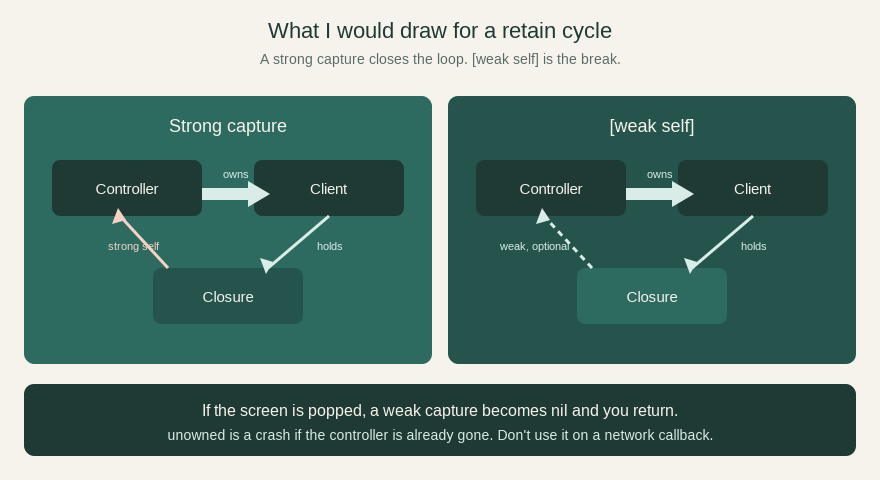 A strong capture closes the loop.
[weak self] is the break, not a magic phrase.
UIKit vs SwiftUI
Plenty of production apps are still UIKit, or a UIKit shell with new screens in SwiftUI. I would not pretend SwiftUI has replaced everything. I’d also not bash UIKit as if it were abandoned.
How I’d choose: look at the surrounding code, the OS versions you support, and the kind of screen. A form or a new feature in a team that’s already writing SwiftUI is a reasonable SwiftUI default. A custom, animation-heavy UIKit view that already works, or a camera or map control the team already has, is a reason to keep UIKit or wrap it.
Interop is a normal answer, not a footnote. UIHostingController drops a SwiftUI view into a UIKit flow. UIViewControllerRepresentable and UIViewRepresentable go the other way. I’d match the existing navigation stack rather than rewrite it to prove a point.
Data flow is where SwiftUI interview questions get specific.
@State is the source of truth the view owns. @Binding is a writable view into someone else’s state. The child does not own that value. In current SwiftUI, a lot of new code uses the Observation framework: an @Observable model, created and owned with @State, passed down with @Environment when several screens need it, and @Bindable when a child needs bindings into that model. Plenty of codebases still use ObservableObject with @Published. In that world, @StateObject creates and owns the object, @ObservedObject is for one you were given, and @EnvironmentObject is the broader pass-down. Those two systems are not the same wrappers. Mixing @StateObject language with an @Observable model as if they were interchangeable is a tell.
Navigation in modern SwiftUI is NavigationStack and navigationDestination. NavigationView still exists in older code. In UIKit, it’s still UINavigationController. If they ask you to talk through a flow, name the API you’d actually use in that codebase.
Spoken: “If this were a new settings screen in an app that’s already SwiftUI, I’d write it in SwiftUI and keep the existing stack. If I have to reuse a UIKit payment sheet, I’d wrap it with UIViewControllerRepresentable rather than rebuild it. For state, I’d own an @Observable model in @State and pass bindings down. If the code already uses ObservableObject, I’d stay consistent and use @StateObject to create it.”
A common SwiftUI mistake is starting a Task in onAppear and never cancelling it. That’s a lifetime bug, and it belongs in the next section.
Concurrency: async/await, tasks, and actors
async/await is the default now. The interesting questions are about isolation, cancellation, and where the work should live.
If you write Task { ... } in onAppear, that work is unstructured: it does not stop when the view goes away. You have to store the task and cancel it, or you keep fetching after the user has left. SwiftUI’s .task { } modifier is the better default for a fetch tied to a screen. It is cancelled when the view leaves the hierarchy.
.task {
    do {
        let profile = try await client.profile()
        self.profile = profile
    } catch is CancellationError {
        return
    } catch {
        self.error = error
    }
}
Cancellation is cooperative. The runtime flags the task. Check Task.isCancelled or try Task.checkCancellation(). URLSession async APIs throw CancellationError when the task is cancelled. If you ignore that, you did not actually cancel.
Actors isolate mutable state. Calls into an actor from another isolation domain are asynchronous. @MainActor is the actor for UI work. Updating a label or a @State property off the main actor is a classic bug. Once types are annotated, the compiler often catches it, which is why isolation beats sprinkling DispatchQueue.main.async everywhere.
TaskGroup and async let are for structured parallelism: two or three fetches that should fail or cancel together. I would use them when I can state the parent-child lifetime in a sentence.
GCD still comes up. DispatchQueue.main.async is how a lot of UIKit completion handlers hop back to the main thread. I’d use it to bridge that existing code. For new work, I’d write async functions and let structured concurrency own the lifetime. If they start asking about mutexes and thread pools in general, that is the concurrency and multithreading post. Keep this answer on Swift.
Sendable is the compiler asking whether a value can safely cross an isolation boundary. If a class is captured in an off-main task and the compiler complains, I’d copy the values I need or isolate the mutation in an actor, not reach for @unchecked Sendable as the first fix.
Spoken: “I’d put the fetch in .task so it is cancelled when the screen goes away. The client is async, the view is on the main actor, and I handle CancellationError separately from a real failure. If this were older UIKit callback code, I’d still hop to the main queue in the completion handler, but I would not start a raw Task in viewDidAppear and forget about it.”
If you want practice saying this while someone interrupts you, see how to communicate your thought process during technical interviews. The APIs are the content. The talking is the test.
App architecture
“Walk me through this app” is not a request for a framework sermon.
I’d split a feature into a view (SwiftUI or a view controller), a state holder (an @Observable model or a view model), a networking type behind a protocol, and a persistence choice that matches the data. The view renders state and forwards actions. It does not own URLSession. The state holder fetches and exposes something the view can bind to. The client can be stubbed.
Persistence is a choice. UserDefaults is for small, non-secret preferences. Tokens and passwords go in the Keychain. A graph you need to query belongs in Core Data or SwiftData. SwiftData is a fine default in a new project that can require a recent OS. Core Data is what a lot of existing apps already have. I would not put an auth token in UserDefaults, and I would not stand up a full store to save a single boolean.
MVC is still how a lot of UIKit apps are structured. MVVM is the phrase interviewers often want: the view observes state, the view model does the work. A simple unidirectional split is also a clean answer. I would not invent three Clean Architecture layers for a two-screen exercise. If the team’s code already has those layers, I’d follow them.
Test seams matter more than the acronym. If the view model takes a UserClient protocol, I can unit-test loading, failure, and cancellation with a stub. Injection can be an initializer argument. You do not need a container to prove the point.
Spoken: “For a profile screen I’d have a view, a profile model that the view owns, and a client behind a protocol. The model calls the client, holds loading and error state, and the view renders that. I’d store the session token in the Keychain, and the last-seen flag in UserDefaults. In a test I’d pass a stub client and assert the state changes. If this app is already UIKit MVC, I would not rewrite the stack just to say MVVM in the interview.”
What else shows up on a mobile or iOS loop
A language-and-framework screen is often only part of the day.
The mobile developer interview prep post covers the rest of the loop: how the rounds are ordered, live-coding logistics, and themes such as offline sync. Don’t turn this article into that guide. If the job is actually React Native or Flutter, start there. This one stays on native iOS.
There is usually a coding round too. Write the same patterns you already know, in clear Swift. When they ask for complexity, name the tight loop and the extra arrays the way the Big O post suggests. If you are also interviewing for Android, switch posts rather than mixing Kotlin into a Swift answer.
Night-before drill
I’d run these out loud, timer on, no notes after the first pass:
- Optionals:
if letvsguard let, and why you would not force-unwrap a payload - Value vs reference types, plus one honest sentence about copy-on-write (structs can still allocate)
- A protocol as a test seam, and what a protocol extension cannot add
- A retain cycle in a network closure,
[weak self], and whenunownedis the wrong tool - UIKit vs SwiftUI: how you’d choose, plus one interop path
- SwiftUI state:
@Stateand@Binding, and Observation vs the olderObservableObjectwrappers .taskvs a rawTaskinonAppear, cancellation, and@MainActor- When you’d still use GCD, and when you would not
- A two-minute “walk me through this feature” answer: view, state, client, persistence
If a pass is sloppy, repeat those two items, not the whole list.
Practicing with OfferBull
A list of property wrappers will not tell you whether you paused before “weak self.”
OfferBull is an AI mock interview app, available on iOS and Android. A voice interviewer asks questions aloud. You answer by speaking. Paste an iOS or mobile job description, or upload a resume, for tailored questions. Follow-ups based on what you said and what’s on the resume. While you practice, you get answer suggestions and STAR structures. English and Chinese. It’s for rehearsal before the interview, not a helper during one.
FAQ
Do I still need UIKit? Yes. Many codebases are UIKit or mixed. You should be able to read a view controller, explain a basic navigation flow, and wrap or host a screen in either direction.
Is SwiftData required?
No. Know when you’d use it versus Core Data, UserDefaults, or the Keychain. If the app already uses Core Data, that’s the answer, not a rewrite.
Should I memorize every property wrapper?
No. Know @State and @Binding well, then either Observation (@Observable, @Bindable, @Environment) or the older ObservableObject set, depending on what the codebase uses. Name the one you’d actually write.
How is this different from a general concurrency interview? This is Swift’s structured concurrency, actors, and UI isolation. Locks, memory models, and thread pools in other languages belong in the general concurrency post.
When do I use weak vs unowned?
weak if the object might already be gone, which is the usual callback case. unowned only when you are sure the lifetimes are tied together, because a dangling unowned crashes.
Practice This Out Loud
Tonight, talk through the retain-cycle snippet, a UIKit-versus-SwiftUI choice, and the .task cancellation story, each in under a minute. Then walk a profile feature with no code in front of you: view, state, client, where the token lives. Record it and listen for filler, and for answers that stop at a slogan. After that, run the same questions in a voice mock that pushes back, and close the app before any real interview. → Practice Now
Take Control of Your Career Path:
- Official Site: www.offerbull.net/mock-interview
- iOS App: Download for iPhone/iPad
- Android App: Download for Android