 OfferBull
Help Desk and IT Support Interview Questions (With Sample Answers) | OfferBull

Help Desk and IT Support Interview Questions (With Sample Answers)
They don’t start with a definition of IT support. They say: “A user calls and says they can’t print. They have a client meeting in ten minutes, and this is the third time this week. Walk me through it.”
If you say “I’d troubleshoot the printer” and stop, you have not answered. They want how you clarify the symptom, what you check first, how you talk to someone who is already late, and when you’d escalate instead of guessing.
That is what help desk interview questions feel like, including IT support and desktop support rounds. This is a spoken question bank about walkthroughs, frustrated users, tickets and priority, and the entry-level questions career switchers actually get. It is not a customer-service essay, and it is not a Linux sysadmin article. When a behavioral story needs a tighter STAR shape, use STAR method interview questions and examples. If a ticket turns into a host problem you would hand to operations, Linux interview questions is the complement.
The names and ticket plots below are fictional and illustrative, not a script from a real queue. Say the answers out loud anyway. The weak lines only show up when you have to finish the sentence.
Troubleshooting walkthroughs interviewers actually run
The order I want in my head is simple: clarify the symptom, reproduce it, check what changed, isolate the cause, fix it or escalate, then document what you did. Interviewers are listening for that path, not for a favorite vendor tool.
Clarify first. “I can’t print” might mean this document, this app, this printer, or the whole floor. “The internet is down” might mean one website, one laptop, or the office. I’d repeat the symptom back in plain language, ask who else is affected, get the exact error when there is one, and ask when it last worked. That last question saves a long walk down the wrong path.
Reproduce it if you can, with the user or on a similar setup. If you cannot, say so, and write down the steps they took. Then look for a recent change: a new laptop, a password reset, a VPN client update, a moved desk, a software push overnight. I would not start swapping hardware before I know whether anything changed.
Isolation is the part people skip. One machine or many. Wired or wireless. Local app or a remote service. A workaround that already exists. The goal is to shrink the problem until you can fix it or hand it off with evidence, not to try every fix you remember in a random order.
A few walkthroughs I’d be ready to talk through, all fictional.
The printer, ten minutes before a meeting. I’d confirm whether the job is queued, whether anyone else on that floor can print, and whether this user can print a test page from another app. If it’s one user and one application, I look at that app’s printer, not the device first. If nobody on the floor can print, I escalate to whoever owns the print server or the device, with the scope already written down. I would not promise the handout will print in time if I cannot see a fix yet. I’d offer a workaround: PDF to a colleague, or a different printer.
“The internet is down.” I’d check whether this device has a link, whether it has an address, whether other sites load, and whether a second device on the same network works. One site failing is not “the internet.” One laptop failing, with the phone on the same Wi-Fi working, is a device or account problem. The whole floor failing is an escalation, and I’d collect a couple of examples before I pass it on.
VPN or email won’t connect. I’d confirm the exact error, the client, and whether this started after a password change or a laptop swap. I’d try the local checks I actually have: clock, cached credentials, whether this network blocks the VPN. I would not ask them to paste a password into chat, and I would not reset an account I don’t have policy cover to reset.
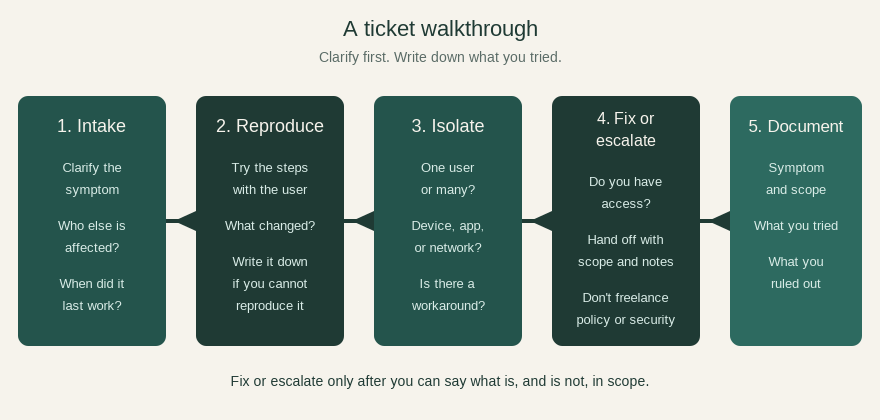
The path I’d say out loud: clarify, reproduce, check what changed, isolate, then fix or escalate, and write it down.
A spoken version I’d use:
“I’d start by restating the symptom and asking who else is affected, and when it last worked. Then I’d try to reproduce it and look for a recent change. If it’s one user, I stay on that machine. If it’s the floor, I escalate with that scope, and I offer a workaround for the meeting instead of guessing at a server I can’t see. I’d write down what I tried before I close the ticket or hand it off.”
Talking to a frustrated user (without sounding scripted)
This is the other half of the same interview. They want to hear that you can stay specific when the person on the line is angry, late, or repeating themselves.
I’d acknowledge the situation in one plain sentence, not a monologue about how much I care. “You’re trying to print for a meeting that starts in ten minutes, and this has already failed twice this week. Let me get the scope, then I’ll either fix it or find you a workaround.” Then I ask the clarifying questions. I would not say “I understand your frustration” on a loop, and I would not promise a time I can’t keep.
I would not argue about whether the problem is “real.” I also would not accept blame for a system I don’t own just to calm the room. If I made a mistake on an earlier ticket, I’d own that one. Fake heroics sound bad in an interview. “I stayed until midnight and rebuilt their profile from scratch” is less useful than “I got them a working path for the meeting, then scheduled the actual fix and told them what to expect.”
When they ask for a behavioral story, keep it concrete and short. Situation, what you did, and how it landed is enough. The STAR method post is there if you want the longer structure. In this round, a tight story beats a formal four-letter recitation.
A spoken answer I’d rehearse, about a fictional user who missed the start of a meeting because VPN failed:
“A sales lead couldn’t join a client call because the VPN dropped after a password reset, and they were already upset when they reached me. I got them onto the call first with a web client their team already had. After that I finished the VPN fix, wrote down the reset-plus-VPN sequence so the next ticket wouldn’t start from zero, and flagged it because two other people had hit the same thing that week. I wouldn’t have promised the VPN in two minutes when I hadn’t reproduced it yet.”

Practice the conversation, not just the fix: what you’d say first, and what you would not promise.
Tickets, priority, and when to escalate
Interviewers will ask how you decide what to work on, and what you’d escalate. They are not asking you to invent a company’s SLA.
I’d describe priority in plain terms. A P1 is something that stops the business, or stops a large group, right now: the office network is down, a whole team cannot log in, or a security issue is in progress. A single user who cannot print, with another printer down the hall, is not that. A single user who cannot reach payroll on payday might still be high, even if the rest of the floor is fine. I’d rather say why I’d raise it than recite a matrix I made up.
Escalation is not failure. I’d escalate when I don’t have the access, when I’ve isolated the problem to a system I don’t own, when I’ve tried the reasonable checks and I’m stuck, or when the clock is running and I need a specialist. Security, a possibly compromised account, and anything that would mean opening someone else’s mailbox or files, I would not freelance. I’d follow the company’s policy and hand it to the team that owns that decision. I am not going to invent that policy in an interview.
Documentation is part of the job, not an afterthought. The next person should be able to see the symptom, the scope, what you tried, and what you already ruled out. I would not write a novel, and I would not close a ticket with “fixed” and no steps. I am not going to describe a particular ticket system’s screens. The habit matters more than the product name.
A spoken version I’d use:
“If the whole floor is down, that’s high priority and I escalate as soon as I have two or three examples, not after I’ve spent half an hour on one laptop. If it’s one user and there’s a workaround, I still take it seriously, but I don’t call it a P1. I escalate when I don’t have access, when the issue sits in a system I don’t own, or when I’m stuck and the clock is running. And I write down what I tried, so the next person isn’t repeating it.”
Entry-level and career-switcher questions
A lot of these rounds are for people who have not held a help desk title yet. The questions sound softer. They are still checking whether you’d be safe on a queue.
“How did you learn this?” is not a request for a speech. Pick a concrete path: coursework, a home lab, a retail or campus job where you already helped people with broken tools, a volunteer refresh of old laptops. Talk about something you actually did, not a list of products you watched videos about. If you built a small lab, say what you used it for. Keep it modest.
Certificates come up. Some employers mention CompTIA A+, or a similar entry cert, as a signal that you’ve seen hardware, networking basics, and troubleshooting language. I’d treat that as one input, not as a rule I invent. I would not tell an interviewer they must have A+ to apply. If I don’t have one, I’d say what I practiced instead and leave it there.
“What would you do with a ticket outside your experience?” is a trust question. I’d say I’d reproduce it, write down what I already checked, look in the team’s runbooks or knowledge base, and ask a teammate or escalate before I start clicking through a production system I don’t understand. I would not pretend I can figure out everything with enough enthusiasm, and I would not sit on the ticket in silence until the user chases me.
Career switchers get a version of “why this work.” If you came from retail or hospitality, talk about listening to a rushed customer, following a process when the floor is busy, and documenting a handoff. Then connect it to a ticket, not to a personality trait. You do not need to apologize for the previous job.

Entry-level rounds still want a spoken walkthrough: how you learned, how you’d ask for help, and how you’d write the ticket down.
Night-before drill
I’d run these out loud, timer on, no notes after the first pass:
- Clarify, reproduce, check what changed, isolate, then fix or escalate, and document
- “I can’t print” ten minutes before a meeting, including a workaround you’d actually offer
- “The internet is down,” and how you’d tell one laptop from a whole floor
- A frustrated-user answer that stays specific and does not invent a hero story
- When you’d raise priority, when you’d escalate, and what you’d refuse to freelance
If a line sounds like a slogan (“I’d just provide great service” or “the customer is always right”), say it again until it names a question you’d ask, a scope, or a handoff.
Practicing with OfferBull
A memorized troubleshooting list will not tell you whether you paused before promising a fix you couldn’t see yet.
OfferBull is an AI mock interview app, available on iOS and Android. A voice interviewer asks questions aloud. You answer by speaking. Paste a help desk, IT support, or desktop support job description, or upload a resume, for tailored questions. Follow-ups based on what you said and what’s on the resume. While you practice, you get answer suggestions and STAR structures. English and Chinese. Use it to rehearse troubleshooting and customer-scenario answers before the interview, not as a helper on a live ticket, and not during a real interview.
FAQ
Do I need CompTIA A+ to get a help desk job? No, not as a rule I can invent for every employer. Some listings mention A+ or a similar cert. If you have one, say so. If you don’t, be ready to talk about how you practiced troubleshooting and how you’d work a ticket.
What’s the difference between help desk and desktop support? Titles vary. Help desk often means the first place a ticket lands, including remote checks and account issues. Desktop support often means hands-on work with the machine. In an interview, ask how this team splits the work instead of treating the labels as fixed.
How should I answer a question about a frustrated user? Stay specific. What was broken, what you said, what workaround or fix you offered, and what you wrote down afterward. Don’t invent a midnight hero story, and don’t hide behind a generic empathy line. If you want a fuller behavioral structure, use the STAR post linked above.
When should I escalate a ticket? When you don’t have the access, when you’ve isolated it to a system you don’t own, when you’re stuck and the clock is running, or when the issue is security or policy and you should not freelance. Escalating with notes is better than guessing.
Is this just a customer-service interview? You’ll get communication questions, but the technical walkthrough still matters. They want a clear path through the problem, and a way of talking to the user that doesn’t make the situation worse.
Practice This Out Loud
Tonight, talk through the printer-before-a-meeting path, “the internet is down,” and a frustrated-user story, each in under a minute. Then do priority and escalation with no notes: what is a P1, what you’d hand off, and what you would not try on your own. Record it and listen for filler, and for answers that stop at “I’d troubleshoot it.” After that, run the same questions in a voice mock that pushes back, and close the app before any real interview. → Practice Now
Take Control of Your Career Path:
- Official Site: www.offerbull.net/mock-interview
- iOS App: Download for iPhone/iPad
- Android App: Download for Android