 OfferBull
Docker Interview Questions for DevOps and Backend Engineers | OfferBull

They put a terminal in front of you, or they don’t, and just say: “The image is 1.4 GB, the container started and exited, and last night someone lost the database because they removed the container. Walk me through it.”
If you recap what a container is and stop, you have not answered. They want the difference between an image and a running instance, where the data actually lived, and what you’d look at first when a process dies on boot.
That is what docker interview questions feel like for DevOps and backend loops. Images and layers first, then Dockerfile habits, then networking and volumes, then debugging out loud. This is a spoken question bank about the container runtime, not a Kubernetes chapter. When the conversation moves to pods, Services, or Ingress, use Kubernetes and container orchestration interview questions. For the broader prep loop, use how to prepare for DevOps and SRE interviews. If the pipeline builds an image and then applies infrastructure, Terraform interview questions is the other half of that handoff.
The sample answers are illustrative, not a script from a real loop. Say them out loud anyway. The weak lines only show up when you have to finish the sentence.
Images, containers, and layers
An image is an immutable package: the filesystem, the default command, and the settings a container needs to start. Once it is built, it does not change. A container is an instance created from that image: a process (or a small tree of processes) with its own filesystem view, network stack, and resource limits. Interviewers sometimes drag virtual machines into this. A VM virtualizes hardware and runs a guest operating system. A container shares the host kernel and isolates a process. I’d say that once, then stay on Docker. The Kubernetes post is where orchestration belongs.
Images are made of layers. Each Dockerfile instruction that changes the filesystem produces a layer, and those layers are read-only and cached. Order matters. If you copy the application source before you install dependencies, every typo rebuilds the dependency layer. If you install dependencies first, and copy source later, most day-to-day edits reuse the cache. Layers are also shared: two images that start from the same base do not each store a full copy of that base on the host.
When a container starts, Docker adds a thin writable layer on top of the image. Anything the process writes goes there, not back into the image. Delete the container and that writable layer goes with it. That is why “we removed the container and the data was gone” is not a mysterious bug. It is the default. Data you care about belongs in a volume, which I’ll come back to.
A spoken version I’d actually use:
“The image is the immutable template, built as a stack of read-only layers. A container is a running instance of that image, with a thin writable layer on top. I wouldn’t keep a database in that writable layer. And I wouldn’t describe a container as a tiny VM past the one-line contrast, because the rest of the question is usually about cache, size, or data that disappeared.”
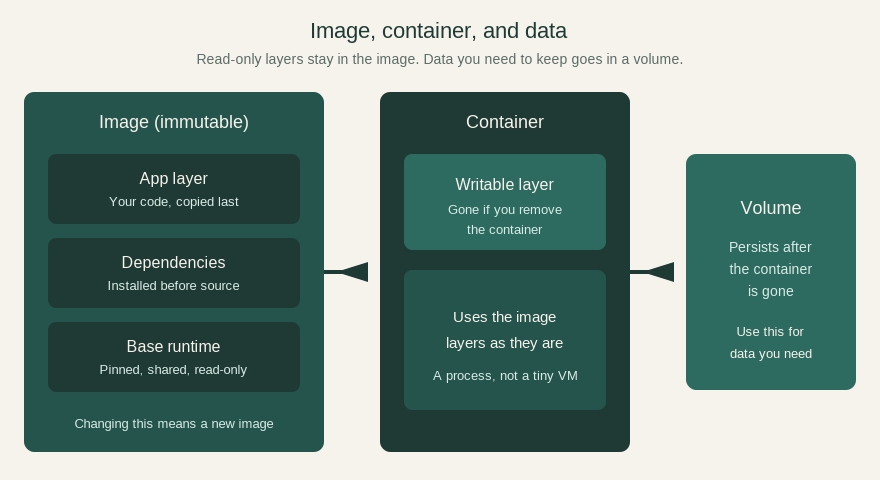
What I’d draw first: read-only image layers, a writable container layer, and data that should outlive the container.
Dockerfile practices interviewers actually probe
This is less “can you recite instructions” and more “would I trust you to ship this file.”
I’d use a multi-stage build when the compile toolchain is heavier than the runtime. One stage builds the binary or the frontend bundle. The final stage copies only the artifact onto a small runtime image. The compiler, the test cache, and the extra headers never land in what you push. That is the usual fix for a 1.4 GB image that is mostly build tools.
I’d run the process as a non-root user. Create the user in the image, then USER to it, preferably with an explicit UID and GID. Root in a container is still a worse default than people think, even if the rest of the isolation is in place.
.dockerignore belongs in the same breath as the Dockerfile. It keeps secrets, local node_modules, .git, and test fixtures out of the build context. A secret that never entered the context cannot be copied into a layer. I would not COPY a .env with production credentials, and I would not bake an API key into an ENV instruction “just for the build” if I can pass it at runtime or use a secret mount.
Tags are mutable. FROM node:22 can point at a different image next month. I’d pin a major or minor tag at minimum, and for a supply-chain-sensitive build I’d pin a digest. I would not pretend :latest is a version.
COPY versus ADD is a small question with a clear preference. COPY just copies local files. ADD can also fetch a URL and unpack a local tar, which is easy to miss when you read the file quickly. I’d use COPY unless I have a specific reason to want that extra behavior.
A few more habits I’d defend, without turning them into religion. One main process in the container, so signals and restarts behave in a way you can explain. ENTRYPOINT as the executable, usually in exec form, and CMD as the default arguments. docker run arguments override CMD and get appended to an exec-form ENTRYPOINT. The shell form of ENTRYPOINT is a trap: it ignores those arguments, and the process may not receive stop signals cleanly because it is not PID 1. Alpine versus distroless is a tradeoff, not a badge. Alpine is small, but musl can break some binaries. Distroless (or a similar runtime-only image) cuts the shell and package manager out of production, which shrinks the attack surface and also makes a 3 a.m. exec harder. A slim Debian-based runtime is a perfectly defensible middle.
A spoken walkthrough I’d rehearse:
“I’d split the build and the runtime with a multi-stage Dockerfile, copy only the artifact into the final image, and run it as a non-root user. .dockerignore keeps local junk and secrets out of the context. I’d COPY, not ADD, pin the base image, and use ENTRYPOINT for the process and CMD for default flags. Alpine or distroless only if I’ve checked the libc and the debugging tradeoff.”

Talk through the file as a stack of layers: what belongs in the final image, and what does not.
Networking and volumes
The default network for a standalone container is a bridge. Containers on a user-defined bridge can usually reach each other by name. The legacy default bridge is more awkward, and I’d create a named network rather than rely on it. Host networking shares the host’s network stack: no isolation, and you typically don’t publish ports because the process is already on the host’s interfaces. I’d use it only when I can explain the reason, not as a way to “make the port work.” none gives the container loopback and nothing else, which is occasionally useful for locked-down jobs. Overlay networks belong to Swarm, and I’d keep that light unless they ask. Kubernetes networking is a different conversation.
Published ports are what actually expose a container port on the host (-p or --publish). EXPOSE in the Dockerfile is documentation. It does not publish the port by itself. That distinction still catches people.
Volumes are how data survives a container. A Docker volume is managed by the daemon. It is the default I’d pick for a database or anything I want to persist without tying it to a path on one developer’s machine. A bind mount maps a host path directly into the container. That’s convenient for local source code, and dangerous if you mount a sensitive host directory or leave a production data directory bind-mounted by habit. A tmpfs mount lives in memory and disappears when the container stops, which is useful for a scratch path or a credential you do not want on disk. Compose is a reasonable way to describe a local set of containers, networks, and volumes. I would not treat it as a substitute for Kubernetes in production.
A spoken version I’d use:
“I’d put the app and the database on a user-defined bridge and let them use service names, not hardcoded IPs. Publishing a port is a run-time choice; EXPOSE alone doesn’t do it. The database files go in a volume, not the container’s writable layer. Bind mounts are for local development. Compose is how I’d run that stack on a laptop, not how I’d claim we replaced an orchestrator.”
Debugging scenarios
“The container starts and exits immediately.”
I would not restart it in a loop and hope. I’d look at docker ps -a so I can see the exited container, then docker logs, then docker inspect for the exit code and the command that actually ran. The usual causes are a wrong CMD or ENTRYPOINT, a missing config file, a crash on boot, or a process that finished (a typo that ran a shell command and returned). If I need a shell, I’d run a one-off container from the same image with an explicit command, or docker exec only if something is still running. I would not assume -d is the fix. Detach does not keep a process alive if it already exited.
“I can’t reach the app from my machine, or one container can’t reach another.”
I’d check whether the process is listening inside the container, whether the port was published, and whether I’m hitting the host port I think I am. Between containers, I’d confirm they share a network and that I’m using the right hostname. docker inspect, docker network inspect, and a short exec with a connectivity check beat guessing at a firewall first. I’d also look at the app’s own bind address. Listening on 127.0.0.1 inside the container will not be reachable through a published port.
“The disk is full, or builds have become painfully slow.”
docker system df is the first picture: images, containers, volumes, and build cache. Dangling images, stopped containers, and leftover build cache are common. I’d prune with care. Unused volumes can hold data someone still needs. I would not run a blanket volume prune in production as a first move.
“I need to see what the process is doing right now.”
Logs first. Then docker exec if the container is up, inspect for env, mounts, and networking, and only then a bigger hammer. I’d say what I would not do: rebuild the image as a way of debugging a running incident, or copy a secret into a new layer “just to test.”
A spoken version I’d use:
“Exited immediately: logs, exit code, and the command that ran, before I restart anything. Can’t connect: is the process listening, is the port published, and are the containers on the same network? Disk full: system df, then prune images and cache carefully, and I don’t delete volumes I haven’t identified. I wouldn’t debug a missing volume by rebuilding the image.”

A debugging pass out loud: logs and inspect first, not a rebuild and not a guess.
Night-before drill
I’d run these out loud, timer on, no notes after the first pass:
- Image versus container versus the writable layer, and why deleting a container can delete data
- A multi-stage Dockerfile, non-root
USER,.dockerignore, and why I’d pin a base image COPYversusADD, andENTRYPOINTversusCMD, including the shell-form trap- Bridge versus host versus
none, andEXPOSEversus publishing a port - Volumes versus bind mounts versus tmpfs, and the “container exited immediately” debug path
If a line sounds like a slogan (“we containerized everything” or “it’s just like a lightweight VM”), say it again until it names a layer, a mount, or a command you’d actually run.
Practicing with OfferBull
A memorized Dockerfile will not tell you whether you paused before putting the database on the writable layer.
OfferBull is an AI mock interview app, available on iOS and Android. A voice interviewer asks questions aloud. You answer by speaking. Paste a DevOps, backend, or container-heavy job description, or upload a resume, for tailored questions. Follow-ups based on what you said and what’s on the resume. While you practice, you get answer suggestions and STAR structures. English and Chinese. It’s for rehearsal before the interview, not a helper during one.
FAQ
What’s the difference between EXPOSE and publishing a port?
EXPOSE documents the port the image expects to use. It does not make that port reachable on the host. Publishing (-p or a Compose ports entry) is what actually maps it.
Should I always use Alpine? No. It’s small, and musl can break binaries built for glibc. Distroless or a slim Debian-based image can be the better fit. I’d pick from the runtime I have tested, not from the smallest number I can quote.
Is Docker Compose a replacement for Kubernetes? No. Compose is a good way to run a multi-container stack locally, or in a simple single-host setup. It is not how I’d talk about pod scheduling, Services, or cluster rollouts. That’s a Kubernetes conversation.
Why did the data disappear when I removed the container? Because it was in the container’s writable layer. That layer belongs to the container. Put data you need to keep in a volume.
What’s the difference between ENTRYPOINT and CMD?
ENTRYPOINT is the executable. CMD supplies default arguments. docker run arguments override CMD and get appended to an exec-form ENTRYPOINT. The shell form of ENTRYPOINT ignores those arguments and can swallow stop signals, so I’d avoid it.
Practice This Out Loud
Tonight, talk through image versus container, a multi-stage Dockerfile, and volumes, each in under a minute. Then do the “container exited immediately” path and the published-port mix-up with no docs in front of you: logs, inspect, and what you would not restart blindly. Record it and listen for filler, and for answers that stop at a buzzword. After that, run the same questions in a voice mock that pushes back, and close the app before any real interview. → Practice Now
Take Control of Your Career Path:
- Official Site: www.offerbull.net/mock-interview
- iOS App: Download for iPhone/iPad
- Android App: Download for Android