 OfferBull
Android Developer Interview Questions (Kotlin, Compose, Architecture) | OfferBull
Android Developer Interview Questions (Kotlin, Compose, Architecture)
They ask: “The user rotates the device halfway through a request. What still happens, and what do you have to restore?”
That sentence is half the story. A configuration change and process death are different events. The ViewModel survives the first. It does not survive the second, unless you stored something in SavedStateHandle or in a real source of truth.
That is what Android developer interview questions feel like. Kotlin, coroutines, lifecycle, Jetpack Compose, and how you’d test a ViewModel. This is a spoken question bank for native Android, not a second tour of Swift and not a week-by-week prep plan. If you also interview for iOS, use iOS developer interview questions. For the pipeline, live-coding logistics, and mobile system-design themes such as offline sync, use how to prepare for mobile developer interviews.
The answers below are illustrative. Practice them out loud, including the part where you correct yourself after saying “the ViewModel survives” too early.
Kotlin interview questions and coroutines
Null safety is a type system, not a habit. String? is a different type from String. You use ?., ?:, and a smart cast after a check. !! is the force, and in an interview I’d treat it like a smell unless I can prove the value is there. A data class gives you equals, hashCode, toString, and copy. It is not a good base type for a hierarchy. A sealed class or sealed interface is the usual tool for a finite set of states: loading, content, error. That is the interview use, not “I know the keyword.”
Extension functions are handy. I’d use them for small, obvious helpers on types I own or on a UI type. I would not hide business rules in a random fun User.toUi() that nobody can find in a test. If the logic needs fakes and failures, it belongs in a type you can inject.
Then they move to coroutines, which is where most of the depth is.
Structured concurrency means a child job is bound to a parent. When the parent is cancelled, the children are cancelled. viewModelScope is cancelled when the ViewModel is cleared, which happens when the owner is finished, not when the phone is rotated. lifecycleScope is cancelled when the lifecycle is destroyed. GlobalScope is almost never the answer I want, because nothing about the screen owns that work.
Dispatchers: Main for UI, IO for blocking I/O, Default for CPU work. withContext is how you switch. A suspend function should be safe to call from any dispatcher unless you document otherwise. Do the hop inside the function if you need a particular thread.
A suspend fun getUser(): User is one shot. A Flow is a stream of values over time: a Room query, a search box, a connection state. Don’t collect a Flow in the UI without tying it to the lifecycle, or you keep doing work in the background, and you can leak a collector. The usual pattern is to expose a StateFlow from the ViewModel and collect in the UI with repeatOnLifecycle or flowWithLifecycle. stateIn is how you turn a cold Flow into a StateFlow in the ViewModel, with a sharing policy you can explain in a sentence. LiveData is still in many codebases. If the project already uses it, stay consistent. For new work, I’d reach for StateFlow.
Exceptions: a failing child cancels its parent, unless you used supervisorScope or a SupervisorJob. Use try/catch around a call you can recover from. CoroutineExceptionHandler only helps with uncaught exceptions at a root scope. It is not a replacement for handling a 404.
val uiState: StateFlow<ProfileUiState> = repository
    .observeProfile(id)
    .map { ProfileUiState.Content(it) }
    .stateIn(
        viewModelScope,
        SharingStarted.WhileSubscribed(5_000),
        ProfileUiState.Loading,
    )
Spoken: “I’d expose a StateFlow from the ViewModel and collect it in the UI with repeatOnLifecycle, so collection stops when the screen is stopped. The repository work is scoped to viewModelScope, which is cancelled in onCleared, not on rotation. I would not launch this in GlobalScope, and I would not collect a cold Flow in the Activity with no lifecycle wrapper.”
The “collector that outlived the UI” story is often just a missing repeatOnLifecycle, or a job started on a scope that lives longer than the screen. That’s a better example than a list of keywords.
Lifecycle and Compose
Configuration change: the Activity is destroyed and recreated. A ViewModel is retained across that. Process death: the process is gone, the ViewModel is gone, and you restore from SavedStateHandle, from rememberSaveable, or from disk. Those are different answers. Mixing them is the usual wrong one.
SavedStateHandle is for small state you need back after process death: an id, a query, maybe a scroll position if you must. It is not a database. A leak, in this part of the interview, is usually an Activity context or a view held by something longer-lived: a ViewModel, a singleton, a listener you forgot to unregister, a coroutine on the wrong scope. I would not put an Activity context in a ViewModel. The Application context is the one that can outlive a screen.
Fragments are still in a lot of apps, especially with the Navigation component. I would not give a 2016 speech about avoiding them. I’d be ready to talk about a Fragment’s view lifecycle versus the Fragment’s own lifecycle, because collecting in the wrong one is a real bug.
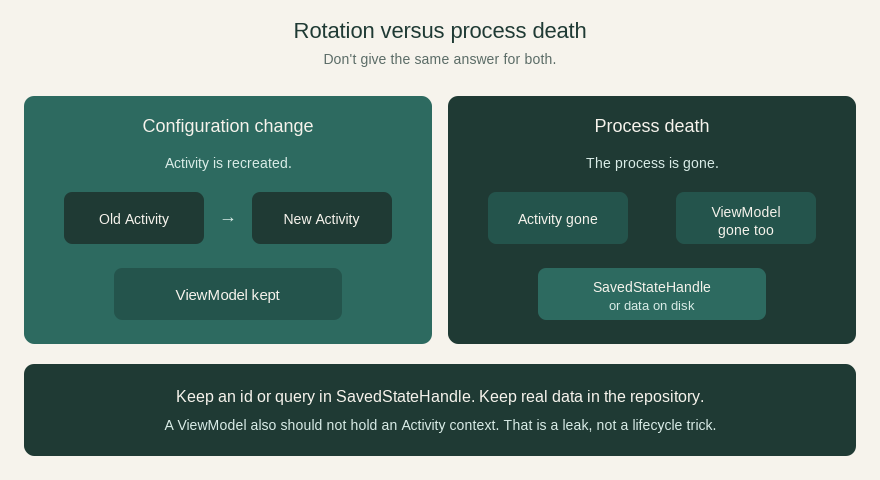 Rotation keeps the ViewModel. Process death does not. Don’t give the same answer for both.
Jetpack Compose interview questions start from recomposition. A composable is a function. When state it read during composition changes, Compose calls it again. State hoisting means the parent owns the state and the child gets the value plus a lambda to change it. That makes the child easier to reuse and to preview.
remember keeps a value across recomposition. It does not survive process death, and it usually does not survive Activity recreation. rememberSaveable can survive a configuration change, and if the value is saveable it can come back after process death. That’s the pair they want you to tell apart.
Side effects: do not start a coroutine in the composable body. It would restart on every recomposition. LaunchedEffect(key) starts a coroutine that is cancelled when you leave composition or when the key changes. That’s the right place for a one-off UI effect tied to a key. DisposableEffect is for something you have to clean up. rememberCoroutineScope is for launching from an event, like a button click, not for work that should be bound to a key the way LaunchedEffect is.
Why is this recomposing too often? The composable is reading state that changes more than it needs, or a parameter is unstable: a lambda created in the parent that isn’t remembered, or a type Compose cannot prove is stable. I’d diagnose by asking what state this function reads, then split the composable or hoist and remember the lambda.
Views and XML layouts are still in many codebases. AndroidView can wrap a legacy view. I would not pretend every screen is already Compose.
Spoken: “Rotation keeps the ViewModel. Process death does not. I’d keep the profile id in SavedStateHandle and the rest in the repository. In Compose, I’d hoist the state, use rememberSaveable for what must survive recreation, and put the fetch in a ViewModel, not in a LaunchedEffect that I then have to reason about twice.”
I’d usually leave the fetch in the ViewModel even in a Compose app, and use LaunchedEffect for UI-only effects (a snackbar, a one-time scroll). That’s a cleaner split in an interview.
Architecture and testing
MVVM is the common interview answer, and it’s a reasonable one. The view (Compose or a View) renders UI state and sends events. The ViewModel holds that state and calls a repository. The repository is the single source of truth, often backed by a local database plus a network source, so you don’t keep one copy in the ViewModel and another in a cache you forget to update.
A use case or domain layer is useful when the ViewModel would otherwise become a junk drawer of business rules. I would not invent three layers for a two-screen exercise. If the team’s app already has them, I’d follow that shape.
Dependency injection, at interview depth, is constructor injection. Hilt is the Jetpack-supported way to do that in many apps. I’d inject a repository interface into the ViewModel. In a test, I pass a fake. I don’t need to set up a full Hilt graph to prove I can test the ViewModel.
Unit-test the ViewModel with a fake repository and runTest, plus a StandardTestDispatcher (or the current test-dispatcher APIs), so you can advance virtual time and assert UiState without sleeping. Instrumented tests and Compose UI tests are for interactions you cannot prove in a unit test: a click that changes what’s on screen, a scroll, navigation. I would not try to “unit test” the framework.
If they follow with an API or offline question, I’d keep a local source of truth and sync when the network is back, with a clear rule for conflicts. That’s enough here. The longer mobile system-design drill is in the mobile prep post. If they pull you into API design itself, that’s closer to backend engineering interviews. If the shop is a JVM team that still mixes Java with Kotlin, keep Java interview questions for experienced developers in the same study week, and don’t mix the language answers in one breath.
Spoken: “I’d have a Compose screen observing a StateFlow from a ViewModel, and a repository as the source of truth. The ViewModel is tested with a fake repository and runTest. UI tests are for the click path I can’t see in those unit tests. If they ask about offline, I’d persist first and sync later, and I’d keep the rest of that design conversation on the same structure I already used.”
If you want practice saying this while someone interrupts you, see how to communicate your thought process during technical interviews. The APIs are the content. The talking is the test.
What else shows up on a mobile or Android loop
A Kotlin-and-Compose screen is often only part of the day.
Use the mobile developer interview prep post for how the rounds are usually ordered, live-coding logistics, and the fuller system-design themes. Don’t turn this article into that guide. If the job description is actually about React Native, Flutter, or Kotlin Multiplatform, start there as well. This one stays on native Android.
There is usually a coding round too. Use the same patterns you would in any language, then write them in clear Kotlin. When they ask for complexity, talk it the way the Big O post suggests: name the tight loop and the extra lists. If you are also interviewing for iOS, switch to the iOS question bank rather than mixing Swift into a Kotlin answer.
Night-before drill
I’d run these out loud, timer on, no notes after the first pass:
- Null safety,
datavssealed, and one careful use of an extension function suspendvsFlow, and why you’d expose aStateFlowfrom the ViewModelviewModelScopevslifecycleScopevsGlobalScope- Configuration change vs process death,
SavedStateHandle, and a leak from an Activity context - Compose: recomposition, state hoisting,
remembervsrememberSaveable LaunchedEffectversus work that belongs in a ViewModel- Why a composable might recompose too often
- MVVM with a repository as the source of truth, plus how you’d unit-test the ViewModel
- A two-minute “walk me through this feature” answer, including one offline sentence if they ask
If a pass is sloppy, repeat those two items, not the whole list.
Practicing with OfferBull
Reading a lifecycle diagram is not the same as saying “process death” at the right moment.
OfferBull is an AI mock interview app, available on iOS and Android. A voice interviewer asks questions aloud. You answer by speaking. Paste an Android or mobile job description, or upload a resume, for tailored questions. Follow-ups based on what you said and what’s on the resume. While you practice, you get answer suggestions and STAR structures. English and Chinese. It’s for rehearsal before the interview, not a helper during one.
FAQ
Do I still need Views and XML? Yes, enough to read them and to wrap a legacy view in Compose if the app still has one. Many codebases are mixed. Don’t treat XML as extinct.
Is Hilt required? No. Constructor injection is required as a habit. Hilt is the usual official way to do it in newer apps. If the team uses another library, follow that, and still inject a repository you can fake.
Should I still learn LiveData?
Enough to read it. For new work, I’d use StateFlow. If the project already collects LiveData, I would not rewrite it in the interview.
Configuration change vs process death, in one sentence?
The ViewModel survives rotation. It does not survive process death, so small UI state goes in SavedStateHandle or rememberSaveable, and real data goes in a store.
Should I fetch in LaunchedEffect?
I’d put the fetch in a ViewModel and keep LaunchedEffect for UI-only effects. If you do start work in LaunchedEffect, know that it cancels when you leave composition or when the key changes.
Practice This Out Loud
Tonight, talk through configuration change versus process death, a cancelled collector, and a Compose state-hoisting answer, each in under a minute. Then walk a profile feature with no code in front of you: Compose screen, ViewModel, repository, what you unit-test. Record it and listen for filler, and for answers that stop at “the ViewModel survives.” After that, run the same questions in a voice mock that pushes back, and close the app before any real interview. → Practice Now
Take Control of Your Career Path:
- Official Site: www.offerbull.net/mock-interview
- iOS App: Download for iPhone/iPad
- Android App: Download for Android